

2026-07-13 - Privilege Escalation allowing a Read-Only API Token to obtain Read & Write access in API Token Authentication for Jira, Confluence, and Bitbucket
Summary | A read-only API token could, under certain configurations, be used to obtain a Read & Write API token for the same user, resulting in a privilege escalation. |
Advisory Release Date | 7/13/2026 |
Affected Products | API Token Authentication for Jira |
Affected Versions | 1.5.0 – 2.7.9 (Jira, Confluence) |
Fixed Version | 2.8.0 |
CVSS Score | 6.5 (Medium) base / 5.9 (Medium) temporal |
CVSS Vector | CVSS:3.1/AV:N/AC:L/PR:L/UI:N/S:U/C:N/I:H/A:N/E:P/RL:O/RC:C |
Summary
This advisory discloses a medium-severity security vulnerability affecting versions up to and including 2.7.9 of the API Token Authentication for Jira, Confluence, and Bitbucket. Please upgrade your app installation to version 2.8.0 or later to fix this vulnerability.
Details
API tokens can be issued with a Read-Only scope, which is intended as a lower-trust credential, safe to hand to automation, monitoring, or third parties that cannot modify data. This issue meant that, under certain configurations, a Read-Only token could be used to obtain a token with Read & Write scope for the same user, granting write capability that the Read-Only token itself was denied.
The issue could be exploited when all of the following were true:
An actor was in possession of a valid Read-Only API token, and
On the Permission tab in the app settings, "Allow everyone to create tokens for themselves" was enabled (or restricted to one or more groups only instead) and
On the Permission tab in the app settings, "Users may only create Read Only tokens," was not enabled.
In instances where "Users may only create Read Only tokens" was enabled, regular users could not obtain a Read & Write token and are therefore not exposed to the privilege-escalation impact described here.
Neither administrator privileges nor a more privileged network position than anyone with a legitimate read-only token wouldn’t have anyway (i.e. we assume someone in possession of a read-only token could already access your Jira/Confluence/Bitbucket to use this token) are required to exploit this issue.
What You Need to Do
Step 1: Mitigation
Update the app to version 2.8.0 or later. After upgrading, read-only tokens can no longer be used to create new tokens of any scope.
If you cannot upgrade immediately, enable "Users may only create Read Only tokens" in the app's permission settings. Note that this also prevents legitimate users authenticating regularly (i.e. not with an API token from our app) from creating read-write API tokens for themselves and it still allows existing read-only API tokens to create new read-only API tokens.
To prevent that, disable “Allow everyone to create tokens for themselves”, which also prevents legitimate users authenticating regularly (i.e. not with an API token from our app) from creating API tokens for themselves. You can still create such API tokens for these users as a system administrator.
As an additional precaution, review and rotate existing read-only tokens, particularly those shared with automation or third parties. The paragraph below describes how to review existing user tokens.
Step 2: Review existing tokens
Please note that the information gathered using these methods do not contain the information whether they have been created using a read-only token since the app unfortunately does not log this data. Rather, they can serve as a starting point for an investigation into whether this user should legitimately have a read-write token while also having read-only tokens.
We are at this point not aware of any exploitation of this vulnerability, but recommend conducting a review anyway out of an abundance of caution.
Retrieve Token Details from Database
Retrieve Token Details from the Audit Log
The Atlassian audit log contains a record for each token created. You can filter the audit log by category “Token Management” and summary “Token created”:
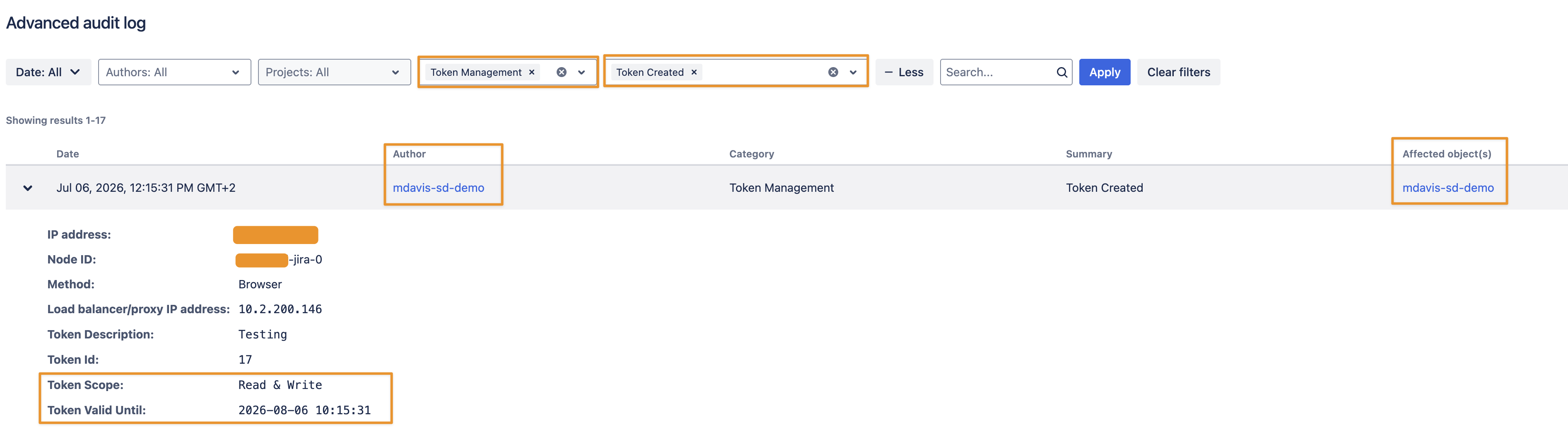
The author is the user who created the token; the “Affected object(s)” column at the end has the same value. The author is only different if the token has been created by another user who owns the “Create & Delete Token On Behalf Permission”. While filtering the log won’t tell you who created a Read & Write scoped token with a Read-Only token, you could still identify any Read & Write scoped tokens that those users shouldn’t have. Please be aware of your audit log retention period; you might no longer find a record for every token. But contrary to the database queries, it will still contain a record for tokens that might have been deleted (revoked) in the meantime.
Support
If you have any questions or need assistance, please contact us through our support portal.