

2026-08-13 - Privilege Escalation to System Administrator
Summary | Any user with application access can change the app configuration, subsequently allowing them to gain system administrator access |
Advisory Release Date | 8/13/2026 |
Affected Products | API Token Authentication for Jira |
Affected Versions | 1.5.0 – 2.8.0 (Jira, Confluence) |
Fixed Version | 2.8.1/2.8.1-p8 |
CVSS Score | 8.8 |
CVSS Vector | CVSS:3.1/AV:N/AC:L/PR:L/UI:N/S:U/C:H/I:H/A:H |
Summary
This advisory discloses a high-severity Broken Access Control vulnerability affecting versions 1.5.0 through 2.8.0 of API Token Authentication for Jira and Confluence, and versions 1.6.1 through 2.8.0 of API Token Authentication for Bitbucket. A low-privileged, authenticated user could escalate their privileges to take over a system administrator account. Please upgrade your app installation to version 2.8.1/2.8.1-p8 or later to fix this vulnerability.
Details
Due to an access-control flaw, a low-privileged authenticated user was able to change a security-relevant app configuration that should have been restricted to system administrators, thereby escalating their privileges.
Exploitation required an authenticated account with application access to the product (a licensed Jira / Confluence / Bitbucket user); a non-administrative account was sufficient. No administrator credentials, no existing administrator token, and no administrator session were required.
 Accounts without application access, e.g., Jira Service Management portal customers, cannot access the affected endpoint and thus cannot abuse it.
What You Need to Do
Step 1: Mitigation
Update the app to version 2.8.1/2.8.1-p8 or later. After upgrading, the app configuration can only be read or changed by system administrators.
In Case You Can't Update
If you can’t update the app, please contact us through our support portal so we can provide a firewall workaround.
Step 2: Impact Analysis
Review the Atlassian Audit Log
The single most reliable way to determine whether this issue was abused is to review the app's configuration-change audit records. Configuration changes don’t happen that frequently, so the full list should be short enough to review by hand. Search for the following in the audit log:
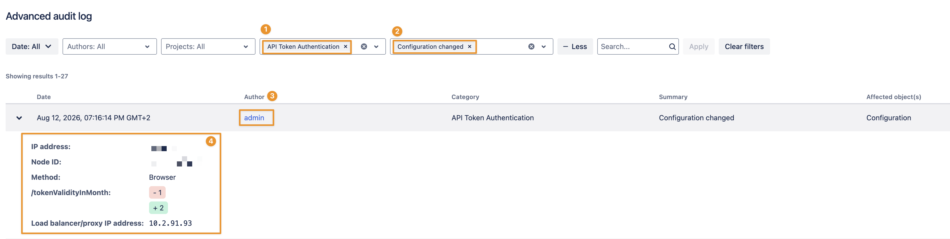
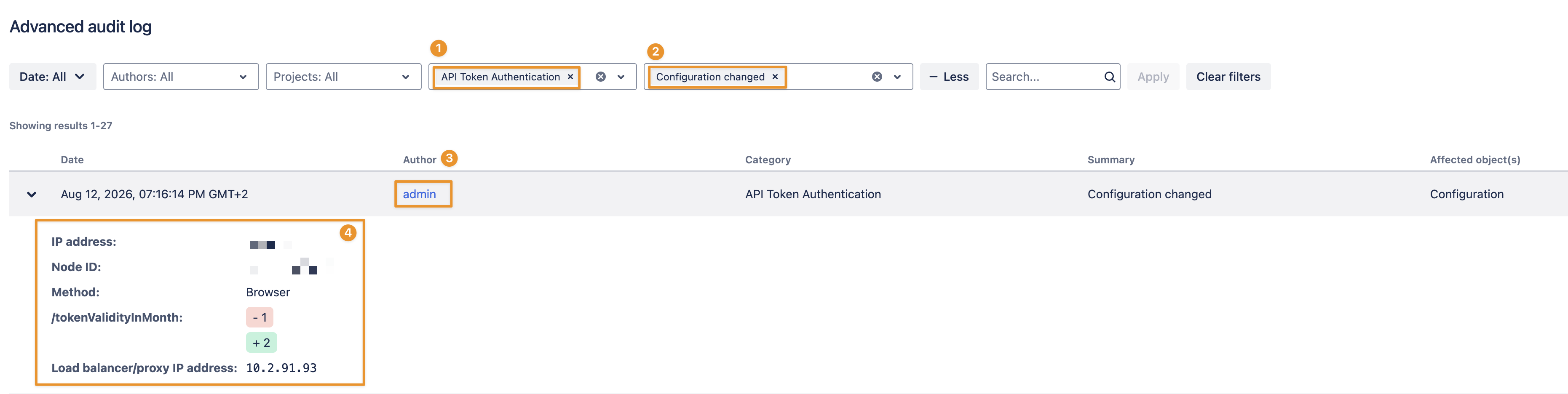
A "Configuration changed" event for API Token Authentication whose author is not an administrator.
You can filter for category (1) API Token Authentication and summary (2) Configuration changed to see the author (3) of the change, and what was changed, along with some additional details (4)
As corroboration and for clean-up:
Review the API tokens currently in use for administrator accounts and revoke any that are unrecognized
Revert any unexpected configuration changes identified in the diffs above.
Please note the limits of this method. Audit retention is bounded by both a time period and a maximum number of stored records. On Jira Data Center, for example, the default database retention is 3 years for a new installation (20 years for an instance upgraded from an older version), capped at 10 million records. So on high-traffic instances, older events can roll off before the time limit is reached. Configuration changes are rare, so they are unlikely to be pushed out by high-volume events, and each node additionally writes the audit log to files on disk (on Jira, <local home>/log/audit, retained separately) which could be forwarded to a Security Information and Event Management system or captured in backups and can be searched as a second copy. Confluence and Bitbucket Data Center have their own analogous retention settings. Because this issue has been present in the app for a long time, abuse older than what is retained or archived would not appear, and an attacker who gained administrator access could subsequently alter or purge the audit log. The absence of matching records is therefore not, on its own, proof that no abuse occurred.
Support
If you have any questions or need assistance, please contact us through our support portal.