

Combining Webhooks and Rovo for Audit-Aware Automation
User Manager 3.16.0 ships structured webhook payloads. User Manager 3.18.0 ships the User Manager Rovo agent. Together they close the loop: the webhook fires when something happens; the agent turns the payload into a human-readable summary that you can route to Confluence, Slack, or a Jira incident issue.
This page is a cookbook. Each recipe is self-contained: trigger, agent prompt, final action, and a sanitized JSON export you can import into Atlassian Automation.
Scope. Webhooks fire on Automated Tasks (taskSuccess / taskFailure) and the Organization API Key 7-day expiry check (orgKeyExpiry). Interactive Bulk Operations do not fire webhooks.
How the recipes are wired
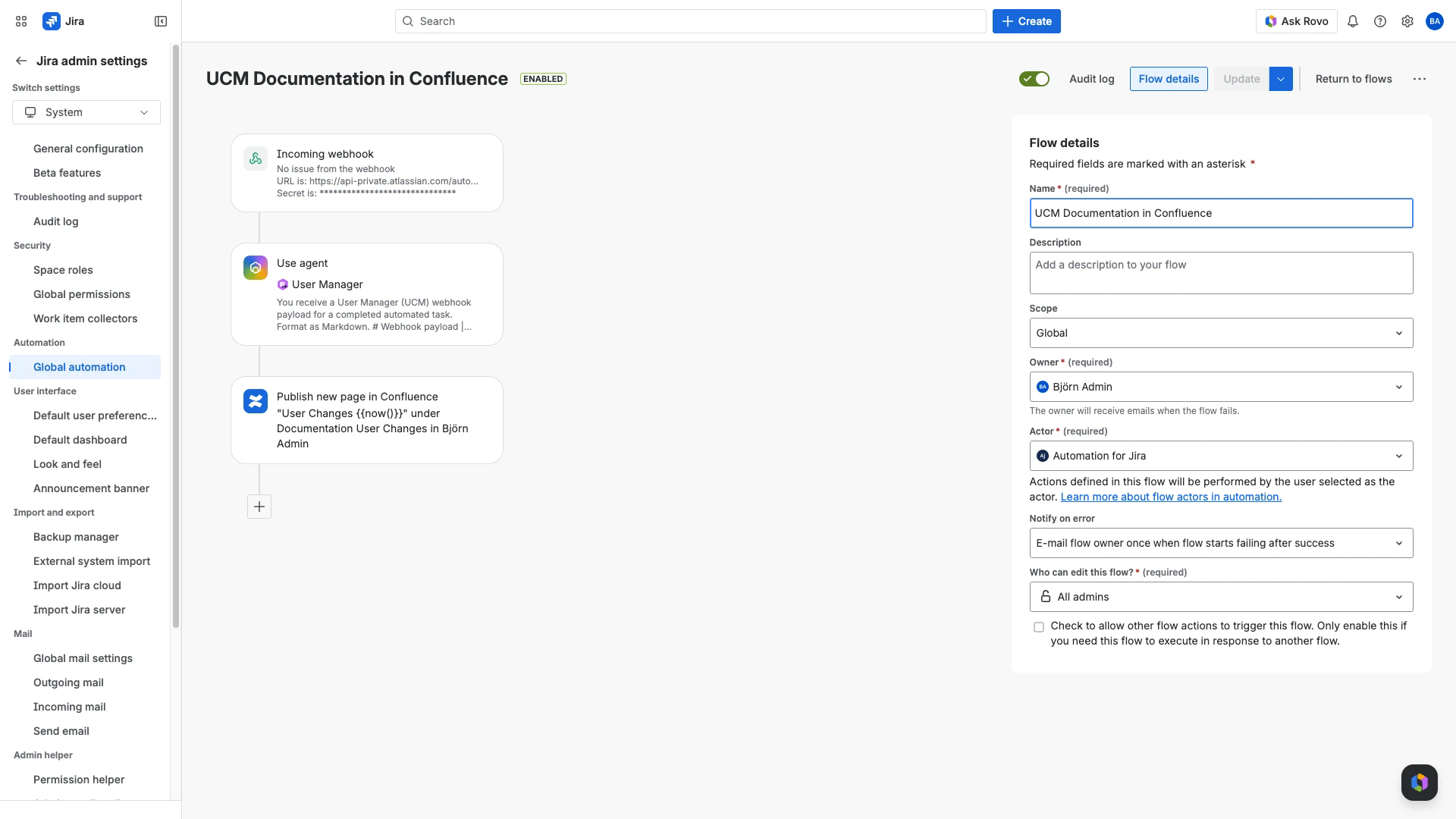
Every recipe is the same three-step shape. Only the final action changes.
- Incoming webhook (no work items) -> Use agent (User Manager) -> Final action
{{webhookData.*}} smart values are available everywhere downstream. The agent step exposes its formatted output as {{agentResponse}} for the final action to consume.
Shared setup (do once per recipe)
Atlassian Automation -> Create flow -> Incoming webhook trigger.
Set Work item criteria = No work items from the webhook. The other two options reject the request because the body carries no Jira work items.
Save or enable the flow. The Webhook URL and Secret appear only after the first save.
Add the steps for the recipe you want (below).
In User Manager: Settings -> Notification Settings -> Add Webhook. Paste the URL + Secret. Pick the trigger(s) the recipe needs. Save.
Use the recipe's agent prompt verbatim. The prompts are tuned to call search-task-results with the processId from the webhook, resolve user / group / app IDs to human names, and emit a format the final action can render directly.
Recipe 1: Auto-published Confluence audit page per task run
When: Every Automated Task completes. You want a stakeholder-friendly summary on a dated Confluence page.
Triggers: Task Success and Task Failure.
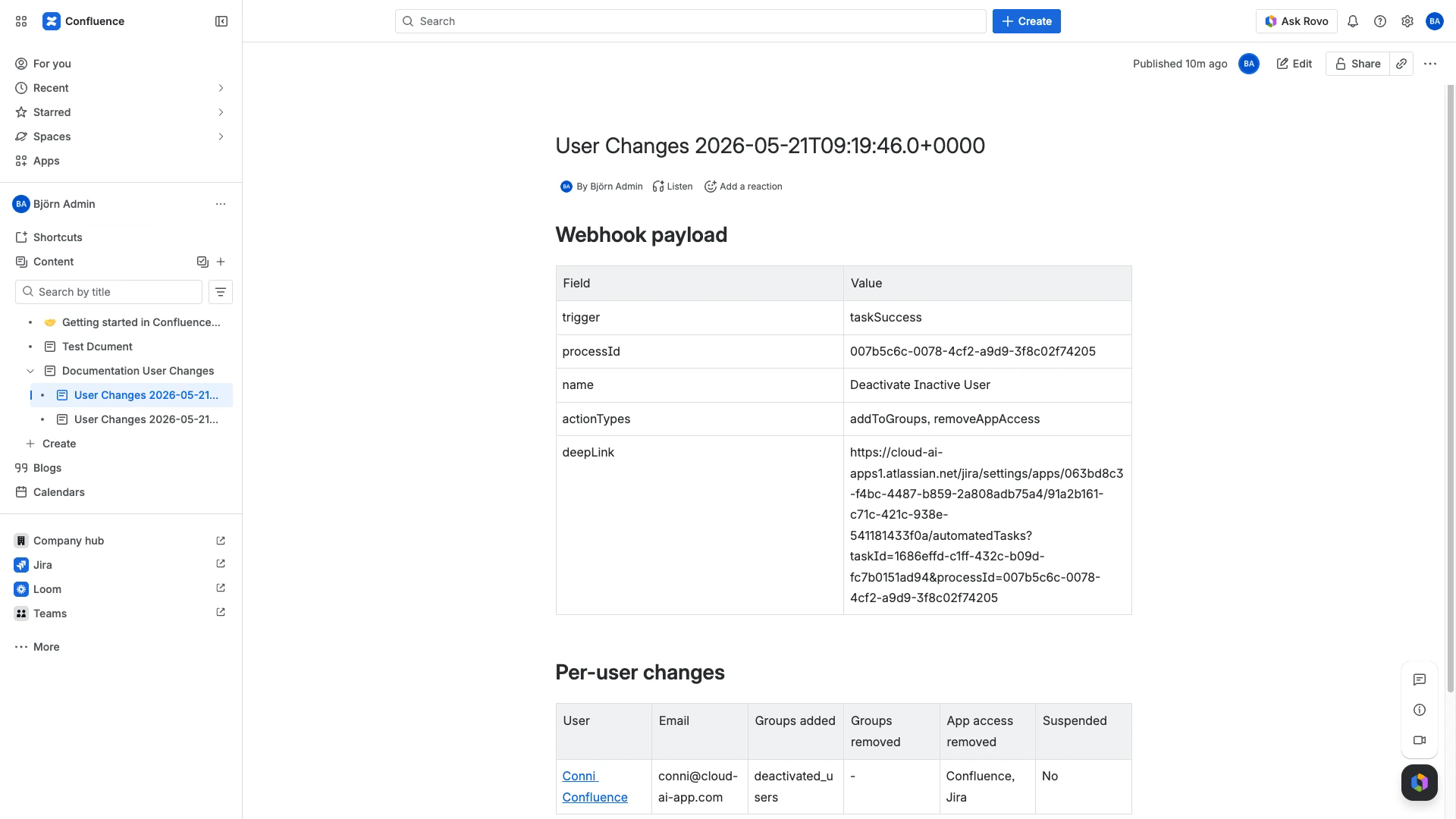
Sample result page:
Agent prompt
- You receive a User Manager (UCM) webhook payload for a completed automated task.
- Format as Markdown.
- # Webhook payload
- | Field | Value |
- | --- | --- |
- | trigger | {{webhookData.trigger}} |
- | processId | {{webhookData.processId}} |
- | name | {{webhookData.name}} |
- | actionTypes | {{webhookData.actionTypes}} |
- | deepLink | {{webhookData.deepLink}} |
- Then call your `search-task-results` action with processId
- `{{webhookData.processId}}` and append:
- # Per-user changes
- | User | Email | Groups added | Groups removed | App access removed | Suspended |
- | --- | --- | --- | --- | --- | --- |
- One row per user from `userChanges[]`. Resolve user names + group names
- (no UUIDs). Use `-` for empty cells.
- Return only the Markdown. No preamble, no commentary.
- Make the deepLink clickable. The link on a user must point to the User Browser
- filtered to that user, not the Atlassian `/people/...` profile.
Final action
Publish new page in Confluence. Space + parent page = your stakeholder hub. Title: User Changes {{now()}}. Body: {{agentResponse}}.
Sanitized JSON
Recipe 2: Slack alert with affected-user summary
When: Every Automated Task completes (success or failure). You want a real-time message in a Slack channel.
Triggers: Task Success and Task Failure.
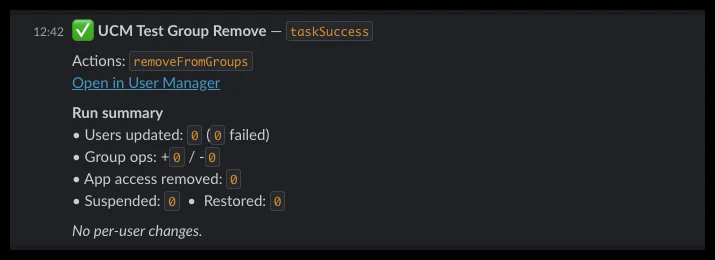
Sample Slack post:
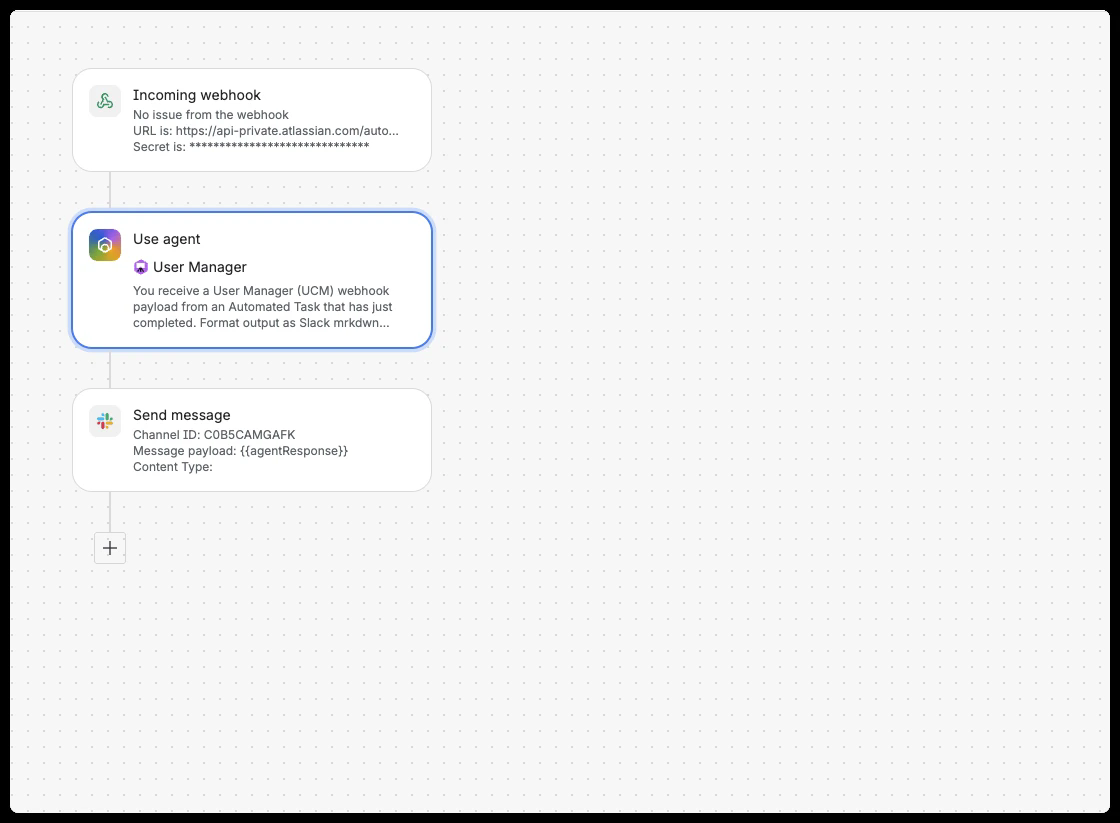
Flow shape:
Agent prompt
- You receive a User Manager (UCM) webhook payload from an Automated Task that
- has just completed. Format output as Slack mrkdwn (NOT Markdown). Slack does
- not render Markdown tables, so use compact lines and bullets instead.
- Payload
- trigger: {{webhookData.trigger}}
- processId: {{webhookData.processId}}
- name: {{webhookData.name}}
- actionTypes: {{webhookData.actionTypes}}
- deepLink: {{webhookData.deepLink}}
- Call your `search-task-results` action with processId
- `{{webhookData.processId}}` and produce output in this exact shape:
- ----
- {status_emoji} *{{webhookData.name}}* - `{{webhookData.trigger}}`
- Actions: `{{webhookData.actionTypes}}`
- <{{webhookData.deepLink}}|Open in User Manager>
- *Run summary*
- - Users updated: `{usersUpdated}` (`{failedCount}` failed)
- - Group ops: +`{groupsAdded}` / -`{groupsRemoved}`
- - App access removed: `{appAccessRemoved}`
- - Suspended: `{usersSuspended}` - Restored: `{usersRestored}`
- *Affected users* ({totalUserChanges})
- - <user-browser-link|Name> (email) - _action summary_
- - ...one bullet per user, max 10. If more, append "...and N more."
- If totalUserChanges is 0, replace the "Affected users" section with a
- single line: "_No per-user changes._"
- ----
- Rules:
- - {status_emoji} = `:white_check_mark:` if trigger=taskSuccess and failedCount=0;
- `:warning:` if taskSuccess and failedCount>0; `:x:` if taskFailure.
- - Backticks around all values to keep them monospaced in Slack.
- - Links use Slack format `<url|label>`, never `[label](url)`.
- - Bold uses single `*`, not `**`.
- - Action summary per user: comma-joined human-readable strings. Resolve
- group UUIDs to group names. Resolve app types to display names
- (Confluence, Jira, Assets, Customer Service - not raw `confluence` /
- `cmdb`). Examples: `+deactivated_users, -admins, -Confluence access`,
- `suspended`.
- - Replace any default `/people/...` link on a username with the User
- Browser deep link filtered to that user.
- - Output ONLY the Slack mrkdwn block above (between the dashed lines but
- WITHOUT the dashes). No preamble, no commentary, no triple-backtick wrapper.
Final action
Send message (Slack integration). Authorise Slack on first use. Pick your channel. Message payload: {{agentResponse}}.
Sanitized JSON
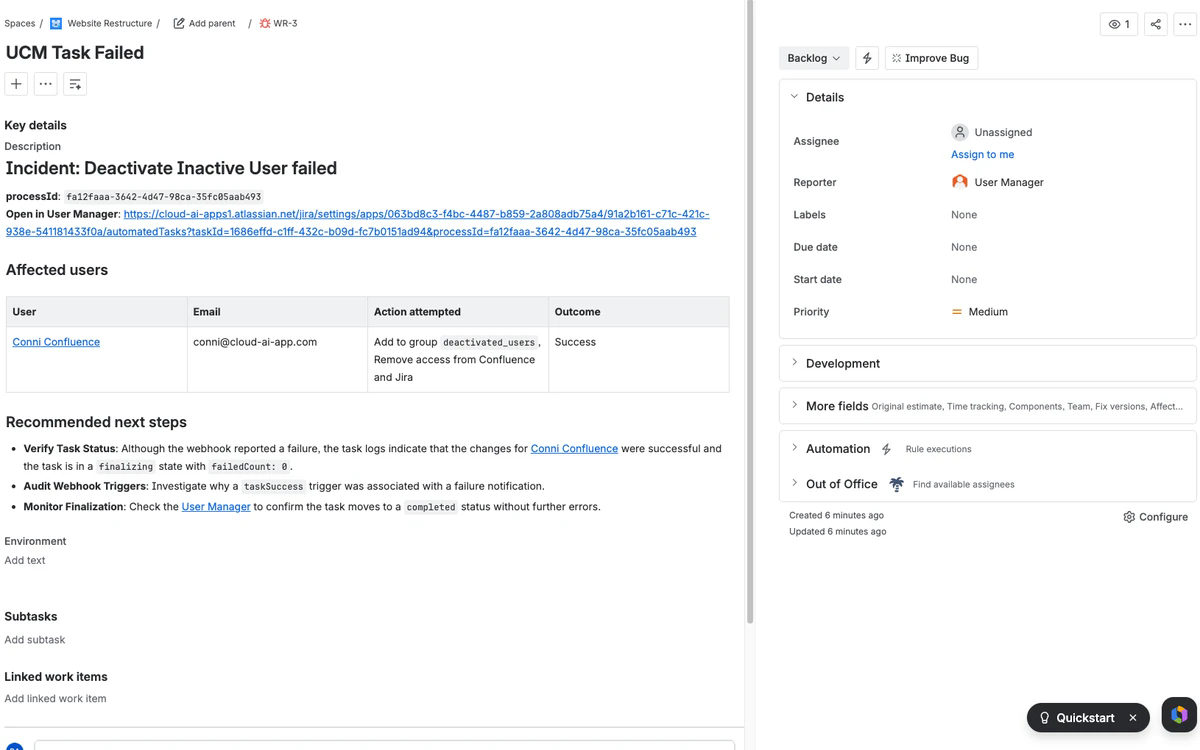
Recipe 3: Auto-create a Jira incident on taskFailure
When: An Automated Task reports failure (or partial failure) and you want the on-call admin to investigate without context-switching.
Triggers: Task Failure. In production, configure the User Manager webhook with Task Failure only - the rule should not run on every success.
Sample incident issue:
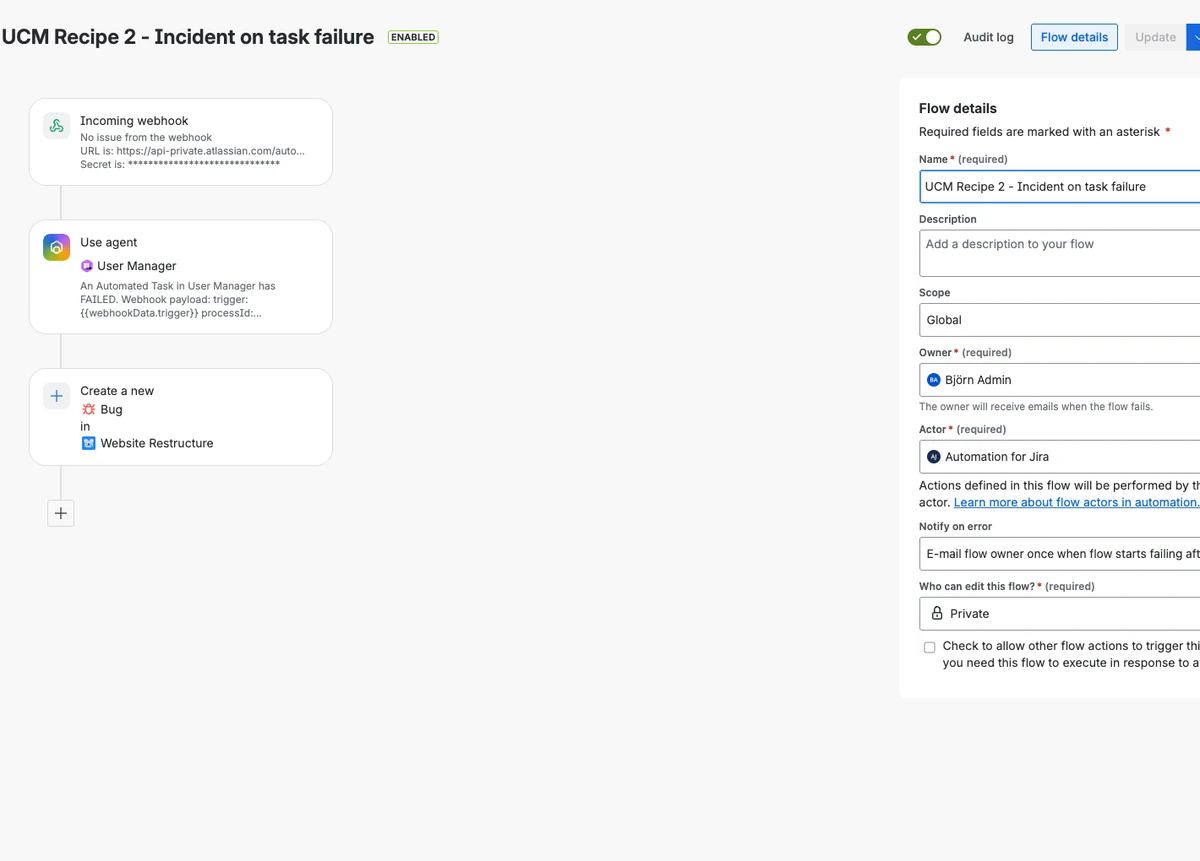
Flow shape:
Agent prompt
- An Automated Task in User Manager has FAILED. Webhook payload:
- trigger: {{webhookData.trigger}}
- processId: {{webhookData.processId}}
- name: {{webhookData.name}}
- actionTypes: {{webhookData.actionTypes}}
- deepLink: {{webhookData.deepLink}}
- Call your `search-task-results` action with processId
- `{{webhookData.processId}}` and produce a concise incident report in Markdown:
- # Incident: {{webhookData.name}} failed
- **processId**: `{{webhookData.processId}}`
- **Open in User Manager**: {{webhookData.deepLink}}
- ## Affected users
- A Markdown table with columns: User | Email | Action attempted | Outcome.
- One row per user from `userChanges[]`. Resolve user names + group names +
- app types. Mark `failedCount > 0` rows clearly. Use `-` for empty cells.
- ## Recommended next steps
- Two or three bullet points based on the action types and failure pattern.
- Return only the Markdown.
Final action
Create work item in your admin project. Pick an explicit Issue type - leaving "Same work type" fails validation because the webhook trigger carries no work item. Summary: UCM Task Failed. Description: {{agentResponse}}.
Sanitized JSON
- includes the trigger + Use agent + Create work item chain. After import, reconnect Rovo, point Create work item at your project, and add a fresh webhook URL in User Manager Settings.
Recipe 4: API key expiry escalation
When: An Organization API key enters the 7-day expiry window.
Triggers: Organization Key Expiry.
No Rovo step needed - the payload is self-contained.
Steps
(Optional) Add a condition:
{{webhookData.trigger}}equalsorgKeyExpiry. Skip if the User Manager webhook is wired to only this trigger.Send email. Recipients: ops alias. Subject:
UCM API key '{{webhookData.name}}' expires {{webhookData.expiresAt}}. Body: includes{{webhookData.settingsUrl}}so the recipient lands on the Webhooks settings page.Create work item. Pick an admin project + explicit issue type. Summary:
Rotate UCM API key: {{webhookData.name}}. Description references{{webhookData.apiKeyId}}+{{webhookData.settingsUrl}}. Due date:{{webhookData.expiresAt}}minus 2 days. Priority P2.
(No agent step. The agent can help during the rotation if someone asks "which webhooks rely on the key expiring on 2026-05-27?")
What the agent will tell you that the payload will not
Question | Payload alone | Payload + Rovo |
|---|---|---|
Task finished | yes ( | yes |
Task name and actions | yes | yes |
Which users were touched | no | yes - resolved names |
Which items failed inside the run | no | yes - via |
Which groups were added or removed per user | no | yes - resolved names |
Whether the result modal opens to the right run | yes via | yes |
Whether a different recent task touched the same users | no | yes - ask Rovo |
Limits worth knowing
The Rovo agent is read-only. Recipes can post messages, create issues, and open pages; they cannot reverse a user-management action automatically.
taskSuccessandtaskFailureare top-level statuses. Usesearch-task-resultsfor partial-failure detail.The webhook URL field in User Manager accepts only Atlassian Automation endpoints. To reach Slack or email, route through an Automation rule.
Bulk Operations do not fire webhooks. Convert recurring bulk ops into Automated Tasks if you want them in these recipes.
Atlassian Automation hides the resolved smart-value contents of action steps in its Audit Log. To inspect actual
webhookDatavalues, route them through a visible artifact: a Confluence page (Recipe 1), a Slack message (Recipe 2), or a Jira issue description (Recipe 3).
Delivery
Webhook delivery uses a CapacityLimiter and a webhook-delivery fail-recovery strategy. Transient delivery failures are retried up to 3 times. Treat the Audit Log of the receiving Atlassian Automation rule as the authoritative record of arrival; if the webhook does not arrive there at all, contact User Manager support.
Related Pages
Webhook Payload Reference - Field definitions and smart values
User Manager Rovo Agent - Full capability list
Atlassian Automation Webhooks - Setup
Creating Automated Tasks - Configure the tasks that fire these webhooks