

Webhook Payload Reference
Every webhook from User Manager delivers a structured JSON body. Atlassian Automation rules can branch on the trigger field, follow the included deepLink, and pass the processId to the User Manager Rovo agent to retrieve per-user detail.
Webhooks are configured in User Manager -> Settings -> Notification Settings:
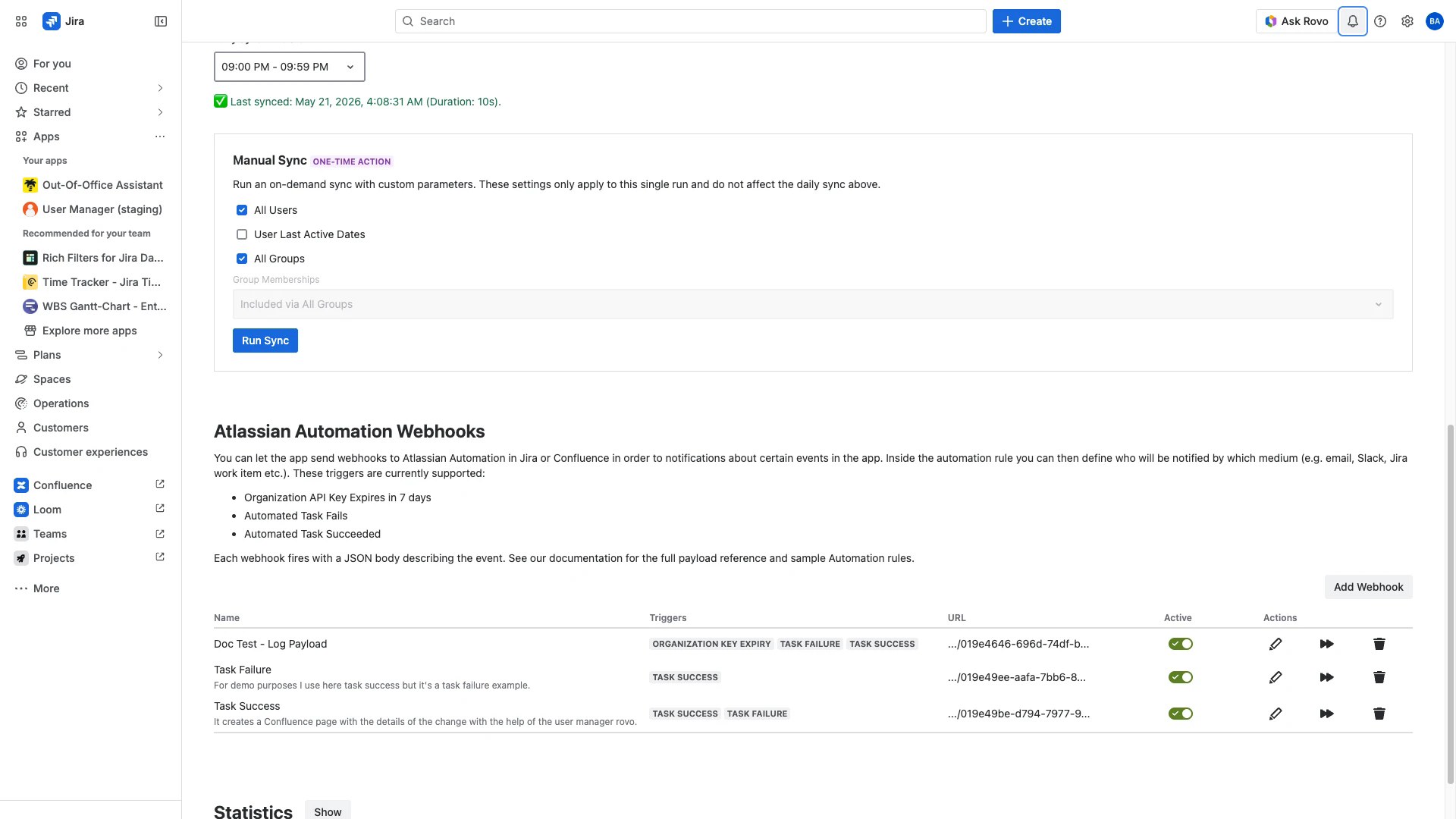
Scope: Webhooks fire on Automated Tasks (taskSuccess / taskFailure) and on the Organization API Key 7-day expiry check (orgKeyExpiry). Interactive Bulk Operations do not fire webhooks.
Quick reference
Trigger | Payload type | Key fields |
|---|---|---|
Automated Task Succeeded |
|
|
Automated Task Failed |
|
|
API Key Expiring Soon |
|
|
All three share the same envelope: a trigger discriminator and a body shaped by the trigger type.
Task payload (taskSuccess, taskFailure)
Sent when an Automated Task finishes - whether successfully or with a top-level failure.
- {
- "trigger": "taskSuccess",
- "processId": "007b5c6c-0078-4cf2-a9d9-3f8c02f74205",
- "name": "Deactivate Inactive User",
- "actionTypes": ["addToGroups", "removeAppAccess"],
- "deepLink": "https://your-site.atlassian.net/jira/settings/apps/063bd8c3-f4bc-4487-b859-2a808adb75a4/<UCM-instance-id>/automatedTasks?taskId=<taskId>&processId=<processId>"
- }
Field | Type | Description |
|---|---|---|
| string |
|
| string (UUID) | Stable identifier for this task run. Use it to fetch full per-user detail via the Rovo agent ( |
| string | Task name as configured in the Automated Tasks view. |
| string[] | Actions this task performed. Observed values (camelCase): |
| string (URL) | Opens the Automated Tasks view filtered to this |
taskSuccess is "no top-level exception", not "every item succeeded". A task that processes 1,000 users where 12 fail will still fire taskSuccess - the run completed. Use the Rovo agent's search-task-results action with the processId to count partial failures.
API key expiry payload (orgKeyExpiry)
Fired once per Organization API key inside the 7-day expiry window. The hourly check runs server-side; you do not need to schedule anything in Jira.
- {
- "trigger": "orgKeyExpiry",
- "apiKeyId": "8c1b1f7a-1234-4f0e-9c2d-5d2b3e4f5a6b",
- "name": "Production - Tom's API key",
- "expiresAt": "2026-05-27T09:00:00.000Z",
- "settingsUrl": "https://your-site.atlassian.net/jira/apps/<UCM-id>/settings/webhooks"
- }
Field | Type | Description |
|---|---|---|
| string |
|
| string (UUID) | Stable identifier for the expiring key. |
| string | Key name as configured at |
| string (ISO 8601) | Exact expiry timestamp in UTC. |
| string (URL) | Opens the User Manager Webhooks settings page. |
Consuming the payload in Atlassian Automation
Atlassian Automation parses the JSON automatically. Reference fields with smart values:
Smart value | Returns |
|---|---|
|
|
| UUID for task runs |
| Task name or key name |
| Comma-separated list of action types (renders as |
| Task result URL |
| API key expiry timestamp |
| Webhooks settings URL |
Branch by trigger:
- If/else: {{webhookData.trigger}} equals "taskFailure"
- -> Create work item
- Else if: {{webhookData.trigger}} equals "orgKeyExpiry"
- -> Email admins, due date {{webhookData.expiresAt}}
Trigger setup requirement
The Incoming Webhook trigger in your Atlassian Automation rule must be configured with Work item criteria = No work items from the webhook. User Manager sends a JSON body with no Jira work items; the other two options will reject the request.
URL allowlist
The webhook URL field in User Manager accepts only Atlassian Automation endpoints:
- https://api-private.atlassian.com/automation/webhooks/...
This matches the URL Atlassian Automation issues when you publish an Incoming Webhook trigger. Generic HTTPS endpoints (Zapier, your own server, Slack incoming webhooks) are not accepted directly. Route them through an Atlassian Automation rule instead - copy the payload forward with a Send web request / Send Slack message / Send email action.
Delivery
Webhook delivery uses a CapacityLimiter and a webhook-delivery fail-recovery strategy. Transient delivery failures are retried up to 3 times. Treat the Audit Log of the receiving Atlassian Automation rule as the authoritative record of arrival; if the webhook does not arrive there at all, contact User Manager support.
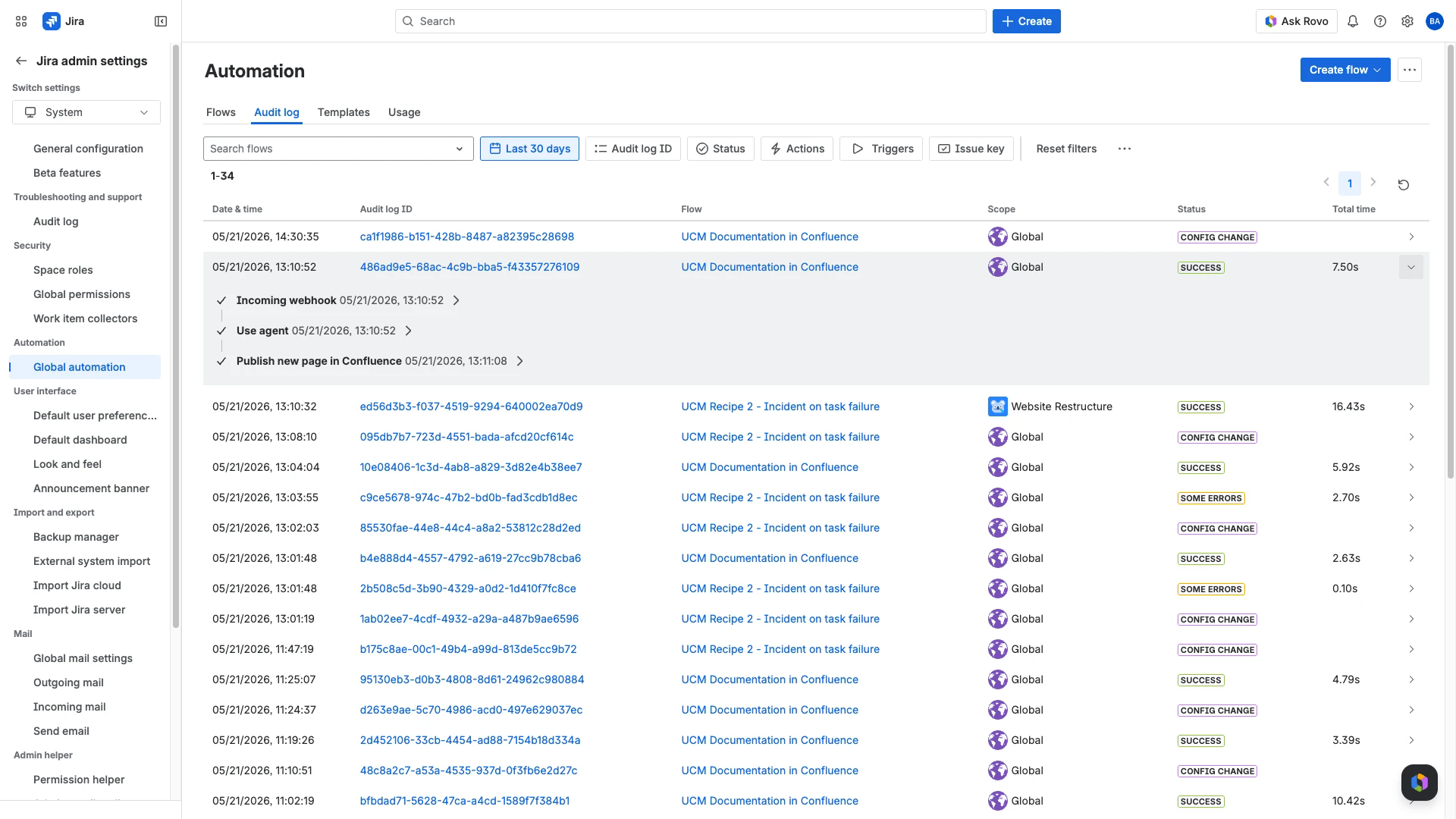
Combining with the Rovo agent
The processId in task payloads is the bridge to the User Manager Rovo agent. Pass it to the agent's search-task-results action to get human-readable per-user changes:
"Show me the audit log for processId 007b5c6c-0078-4cf2-a9d9-3f8c02f74205."
The agent resolves user IDs to names, group IDs to group names, and app types to display names. Use this when the webhook fires taskSuccess but partial failures need investigation. See Combining Webhooks and Rovo for Audit-Aware Automation for end-to-end recipes.
Related Pages
Atlassian Automation Webhooks - Setup and triggers
User Manager Rovo Agent - The receiving end of the
processIdCombining Webhooks and Rovo for Audit-Aware Automation - End-to-end recipes