Jira Work Items in HubSpot
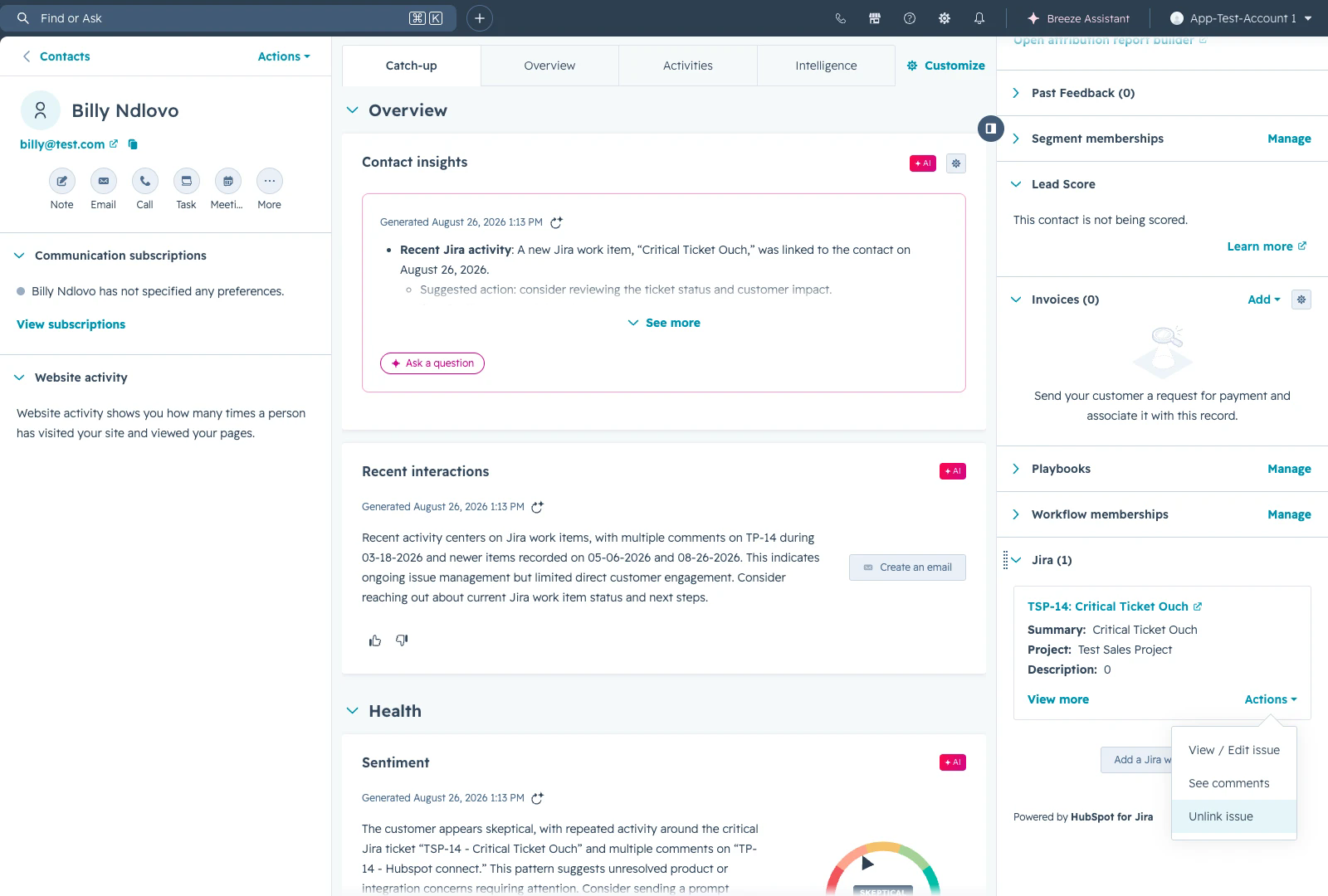
Linked Jira work items appear on the HubSpot record they are associated with. From HubSpot you can open a linked work item, edit the fields your administrator has made editable, reply to comments, and create or link further work items.
Viewing Jira Work Items Linked to HubSpot
When a HubSpot object is linked to a Jira work item, a notification appears in HubSpot after two minutes, informing the object owner.
A note is added within the object to indicate which Jira work item has been linked.
Accessing a Linked Jira Work Item in HubSpot
Open the HubSpot object where the Jira work item is linked.
Locate the Jira section on the right-hand side.
Click View more to see additional issue details.
Note:
Jira work items can be linked to HubSpot from any Jira space.
However, when creating a Jira work item from HubSpot, only pre-configured Jira spaces will be available for selection.
Viewing and Editing the Jira Work Item
Click Actions → View / Edit issue.
In the full view, you can read or edit the Jira work item directly within HubSpot.
After making changes, click Update Jira Work Item to sync the updates with Jira.
Viewing and Replying to Comments
Click Actions → See comments.
View all Jira work item comments within HubSpot.
Reply to comments directly from HubSpot.
Removing a Linked Jira Work Item
Click Actions → Unlink issue to unlink the Jira work item from the HubSpot object.
Linking or Creating Jira Work Items from HubSpot
You can link Jira work items to a HubSpot object in two ways:
Linking an Existing Jira Work Item
Click Add a Jira work item.
Select an existing issue from the dropdown list.
Click Attach Jira Work Item to link it to the HubSpot object.
Creating a New Jira Work Item
Click Create New Jira Work Item.
Fill in the required fields.
Click Create Jira Work Item to generate and link the issue.
Note: When creating a Jira work item from HubSpot, you can only select a Jira space that has been configured in the app settings.