

Analytics and Reporting with Out of Office Data
Two reporting questions come up around absences: who is away, and what happened to the work they left behind.
Search and report on who is away
The app publishes six absence fields to Jira. Read one through a user field on the work item - assignee or reporter - then a dot, then the field name. JQL Filter Configuration Guide lists all six fields with their types.
Three of the six are number fields, matched with = 1.
Question | Query |
|---|---|
Whose work items have an assignee who is out today? |
|
Which of those are still open? |
|
Who loses their assignee tomorrow? |
|
Whose assignee has an absence starting soon? |
|
Which work items will not get an answer from their reporter today? |
|
The other three hold dates and text. The JQL guide gives their types and examples.
Filters written against the Connect version used dotted names, as in assignee.outofoffice.today. Forge does not permit a dot inside a field name, so every alias was renamed. A dotted name raises no error: Jira accepts the query and returns nothing, so a filter built on one reads as though nobody is away. Rewrite anything built on an old name. Migrating from Connect to Forge lists each old name against its replacement.
Put a query on a dashboard
The fields behave as ordinary Jira fields, so a query goes anywhere Jira takes JQL, including a board's card colour rules - see Board Card Colors - Visual Status. To keep one in view:
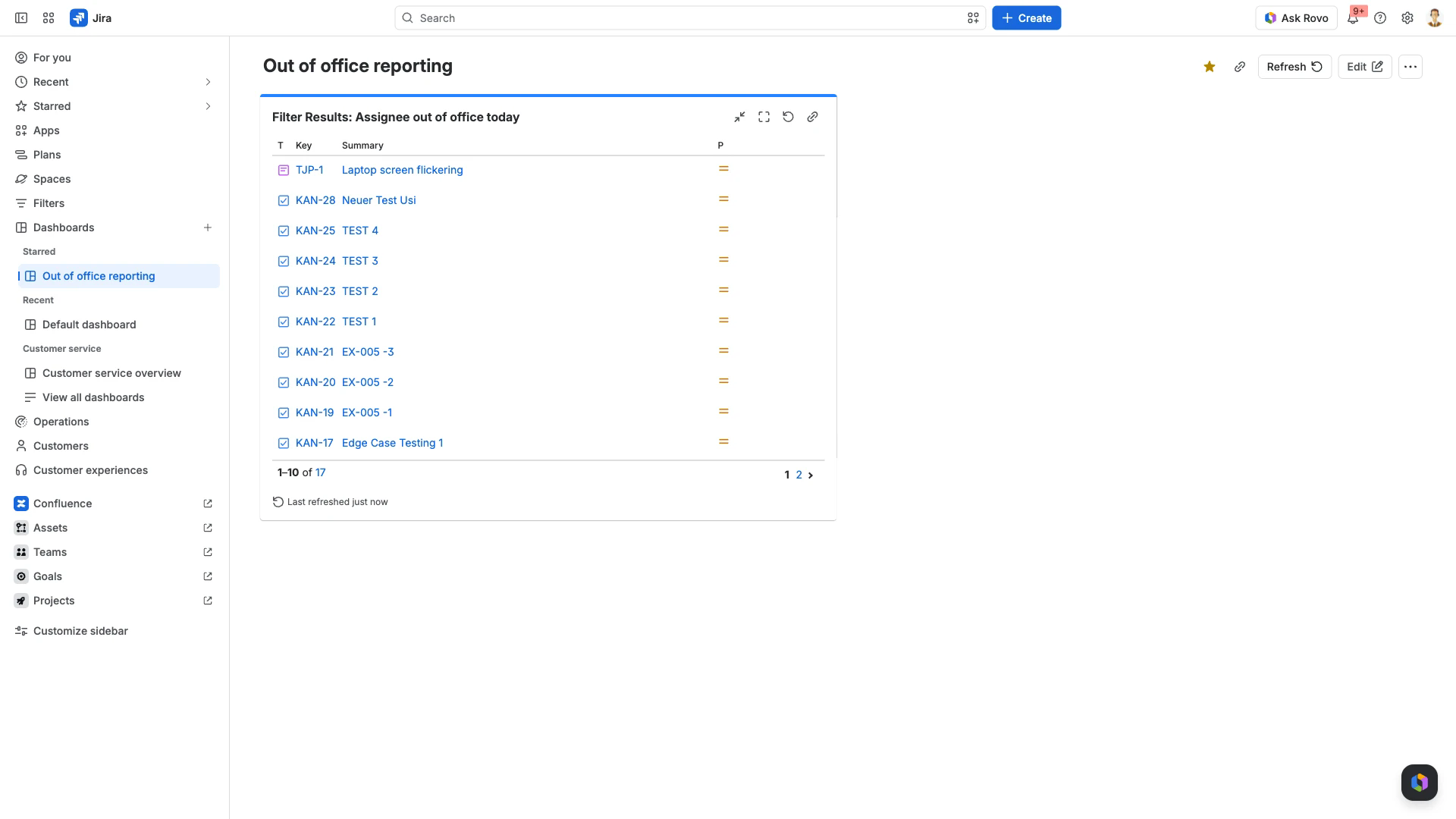
Run the query in work item search, select Save filter, name it and save.
Open the dashboard and select Edit, then Add gadget.
Search the gadget list for Filter Results and select Add.
Choose your filter under Saved Filter, then select Save.
The gadget lists what the filter returns, up to Number of results - 10 by default, 50 at most.
assignee.outofoffice-today.Read what a rule reassigned
To see the work items a rule actually moved, open the rule's own record. In My Rules, the Reassignments column carries a button reading, for example, 8 of 8 passed. Select it to open the Reassignment Log for that rule.
The log has two tabs.
Reassignments lists every work item the rule moved, with its summary, status, when it was last edited, reporter, current assignee and the trigger that moved it. Each key links to the work item.
Failures lists the work items the rule could not reassign, with the error it hit.
Approver swaps are recorded in the same log alongside the assignee reassignments, including swaps that failed and swaps where the replacement approver was out of office as well.
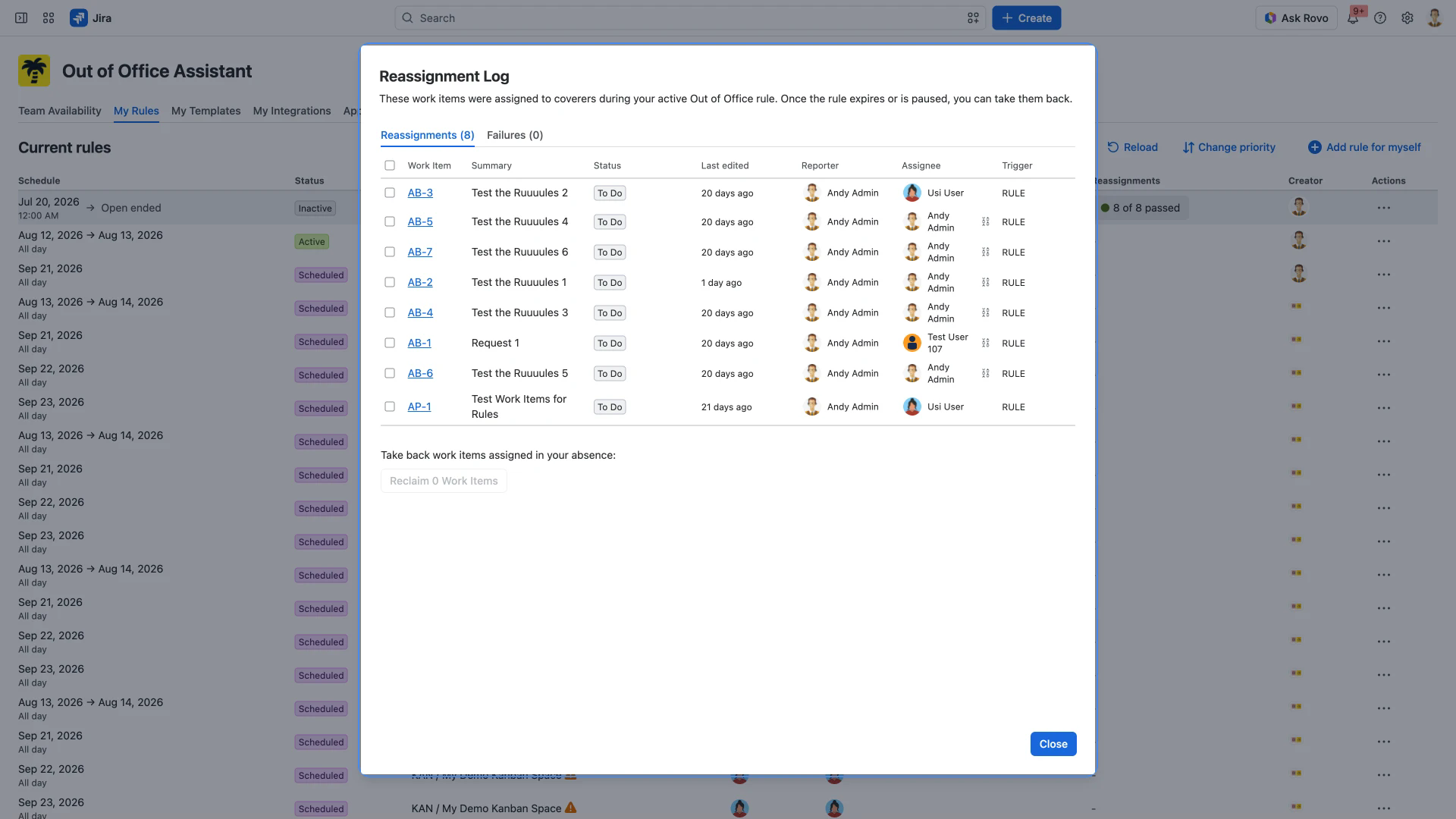
Below the list, a button reading Reclaim 0 Work Items until you tick something hands the selected work items back to their original assignee. Reclaiming Reassigned Issues covers when that is available and how long the log is kept.
Related pages
JQL Filter Configuration Guide - the six absence fields, and scoping a rule with a JQL filter.
Reclaiming Reassigned Issues - taking reassigned work items back when you return.
Board Card Colors - Visual Status - the same fields, colouring cards on a board.
The List of Out of Office Rules - the My Rules tab and what each column shows.