

Mention Detection and Auto-Reply
When someone @-mentions you in a work item comment while you are away, Out of Office Assistant appends a coloured out of office lozenge next to your name in that comment, so the person writing it sees you are absent. Tagging is set per rule, in the Mention Tag field of the rule that covers the absence.
Turn tagging on
The choice sits on the rule of the person who is away, not on the rule of the person writing the mention. Set it on your own rule, for the absence you want tagged. No administrator step is needed.
Go to My Rules and select Add rule for myself. To change a rule you already have, open Actions on its row and select Edit.
Enter the absence period at the top of the form.
Scroll to Mention Tag, the last field on the form, and choose one of the three options below.
Select Create Rule.
Option | What it does |
|---|---|
Don't add an Out of Office tag. | The default. Mentions of you are not tagged. |
Add an Out of Office tag, when out of office. | Mentions of you are tagged while you are out of office. |
Add the tag 4 days ahead of the absence. | Tagging starts four days before the absence begins. |
A new rule opens with the site-wide default an administrator sets in App Settings > General Settings > Mentions in Comments. The app describes that dropdown as "the default when creating new rules or templates"; its values read Don't add an out of office tag, Add an out of office tag, when out of office and Add it 4 days ahead of the absence. Pick a different one on any rule.
Mention Tag sits at the foot of the rule form, below Message Text and the service desk checkbox.
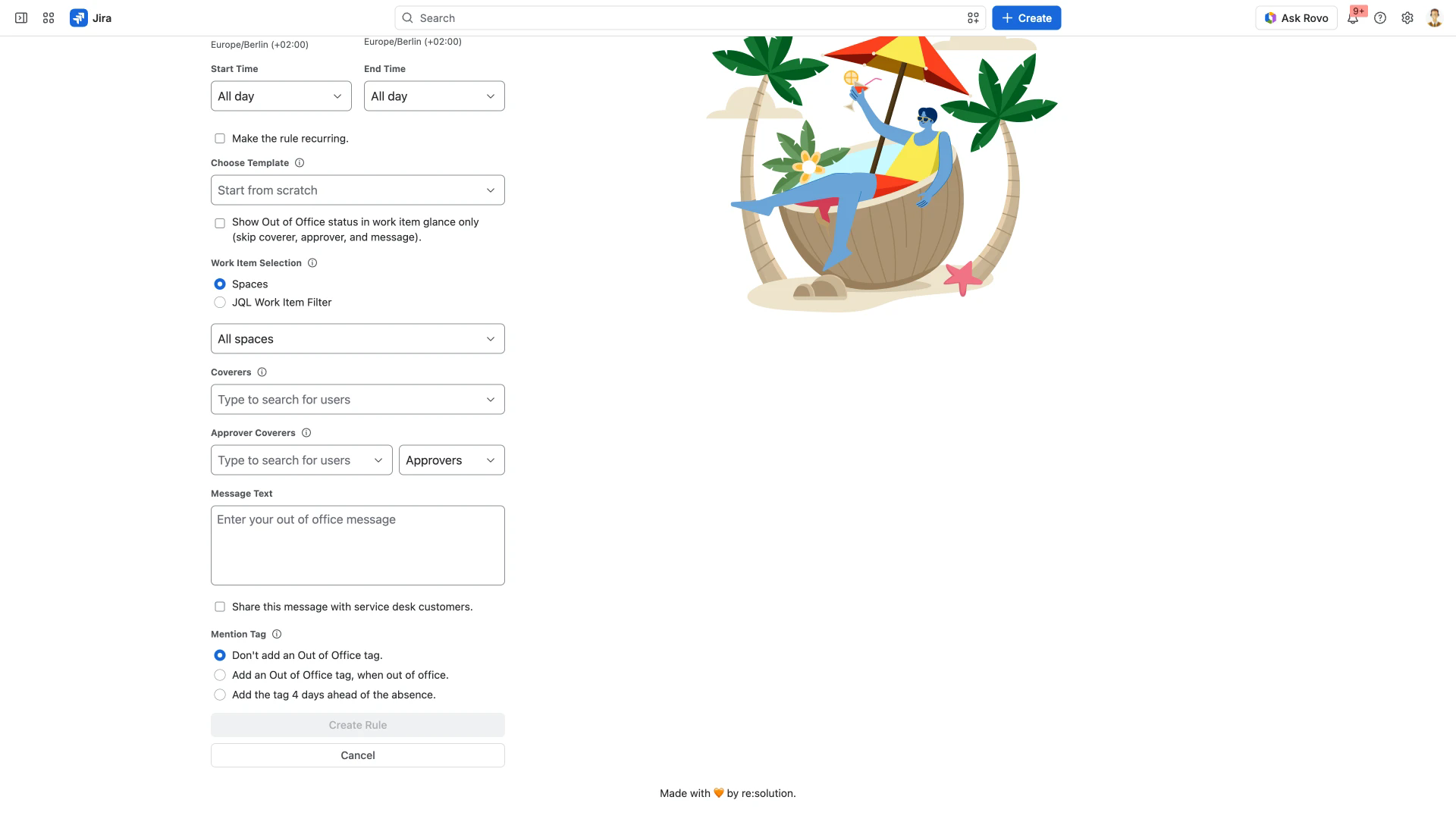
Create Rule stays disabled until the rule does something beyond naming dates. Give it a coverer, an approver coverer or a message, or tick Show Out of Office status in work item glance only (skip coverer, approver, and message) if tagging is all you want from this rule. That checkbox keeps Mention Tag.
Where the tag appears, and when
The tag is added only to @-mentions of you in work item comments. Mentions of you anywhere else are not tagged. A rule limited to certain spaces only reassigns work items and swaps approvers there, but the tag shows your absence on work items in every space.
The tag text follows the absence dates. During the absence it reads Out today, Out until tomorrow or Out until with the last day of the absence, for example Out until Oct 23. Before the absence starts it reads Out tomorrow or the period, for example Out Oct 20 - Oct 23. A rule with no end date reads Off - no end date, or Starting with the first day before it begins.
It is also not in the comment at the moment it is posted. The tag appears once the work item view is reloaded, so refresh the work item before concluding that tagging is off.
Mentioning yourself is never tagged. Jira does not send the app an event for a self-mention, so there is nothing to act on. Mentions written by other people are unaffected.
Out of office messages
Message Text on the same rule is a separate feature. It supplies the text of the comment the app posts when a rule hands one of your work items to a coverer, described on Issue Assignment and Watcher Management. Whether service desk customers see that comment depends on the Share this message with service desk customers. checkbox directly above Mention Tag, described on Service Desk Customer Notifications.