

Migrating from Connect to Forge
Out of Office Assistant now runs on Atlassian Forge instead of Atlassian Connect. Your configuration moves across on its own, including your REST API tokens, which become legacy tokens. Afterwards an administrator updates the JQL search aliases, reselects the space admins' spaces and replaces the legacy tokens before 31 December 2026. If you manage rules for Jira Service Management customers, also choose the customer groups.
Start the upgrade
A Jira administrator starts it, and the app does everything else. Once the Forge version is available for your site, open Connected apps in Atlassian Administration, find Out of Office Assistant and select Update. Inside Jira, Apps > Manage your apps leads to the same screen.
There is nothing to prepare beforehand and nothing to import afterwards. Rules keep running while it happens, and the app keeps the same Marketplace listing, so this is an upgrade rather than a new installation.
If the upgrade does not complete, or something is missing once it has, raise a ticket at resolution.de/go/support and name your site address. The app's Help menu reaches the same place through Contact us under Need Help?. Do not uninstall and reinstall the app to try to clear it; that is not how the migration is re-run.
What the upgrade does on its own
The data migration runs when the Forge app is installed or upgraded; there is no import step to trigger by hand. It reads the configuration held by the Connect app, writes it into its own storage, and marks the installation as migrated, so a later upgrade does not transfer the same data again.
These come across:
Your out of office rules
Your Tempo integration configuration
General settings
REST API tokens, as Legacy tokens that can be revoked but not regenerated
An existing Slack connection keeps working without being reconnected: Slack events still sent to the Connect app are forwarded to the Forge app and handled there.
Update your JQL search aliases
Forge does not allow dots in search aliases, so every alias the app provides now uses hyphens. A saved filter written with the old dotted name no longer resolves and has to be edited.
Nothing warns you about a stale filter: a board or dashboard gadget built on a dotted alias simply stops returning the people who are out of office.
Connect alias | Forge alias |
|---|---|
|
|
|
|
|
|
|
|
|
|
|
|
Each alias returns what it always did. To fix the affected queries:
Search saved filters, board card colour rules, dashboard gadgets and automation rules for the text
outofoffice.Replace each dotted name with the hyphenated name from the table, then save.
Run each edited query once and confirm it returns the people you expect.
REST API tokens
Replace legacy REST API tokens before 31 December 2026. REST API tokens from the Connect app were imported into the Forge app as Legacy tokens, which can be revoked but not regenerated. They are listed under Legacy tokens in Administration > Rest API Permissions. A legacy token stops working on the date in its Expires column; tokens that had no expiry date in the Connect app stop working at the end of 31 December 2026. Create a new token before then and switch your integrations to it, as described in REST API Endpoints Documentation.
The Forge app accepts REST requests on the new base URL https://out-of-office.resolution-cloud.com/rest/1.0/. Requests with a legacy token can still use the old base URL https://out-of-office-connect.herokuapp.com/rest/1.0/, which forwards them to the Forge app. New tokens must use the new base URL.
Integrations after the upgrade
Tempo, Microsoft 365 (Outlook), Slack and Google Workspace can now be set up once for the whole site, as global integrations under Administration > Global Integrations. A Jira admin configures them, and users do not have to authorize them one by one.
Tempo
The Tempo setup has moved to Administration > Global Integrations. Your Tempo configuration is carried over; check it there after the upgrade. See Integration with Tempo - Admin Setup.
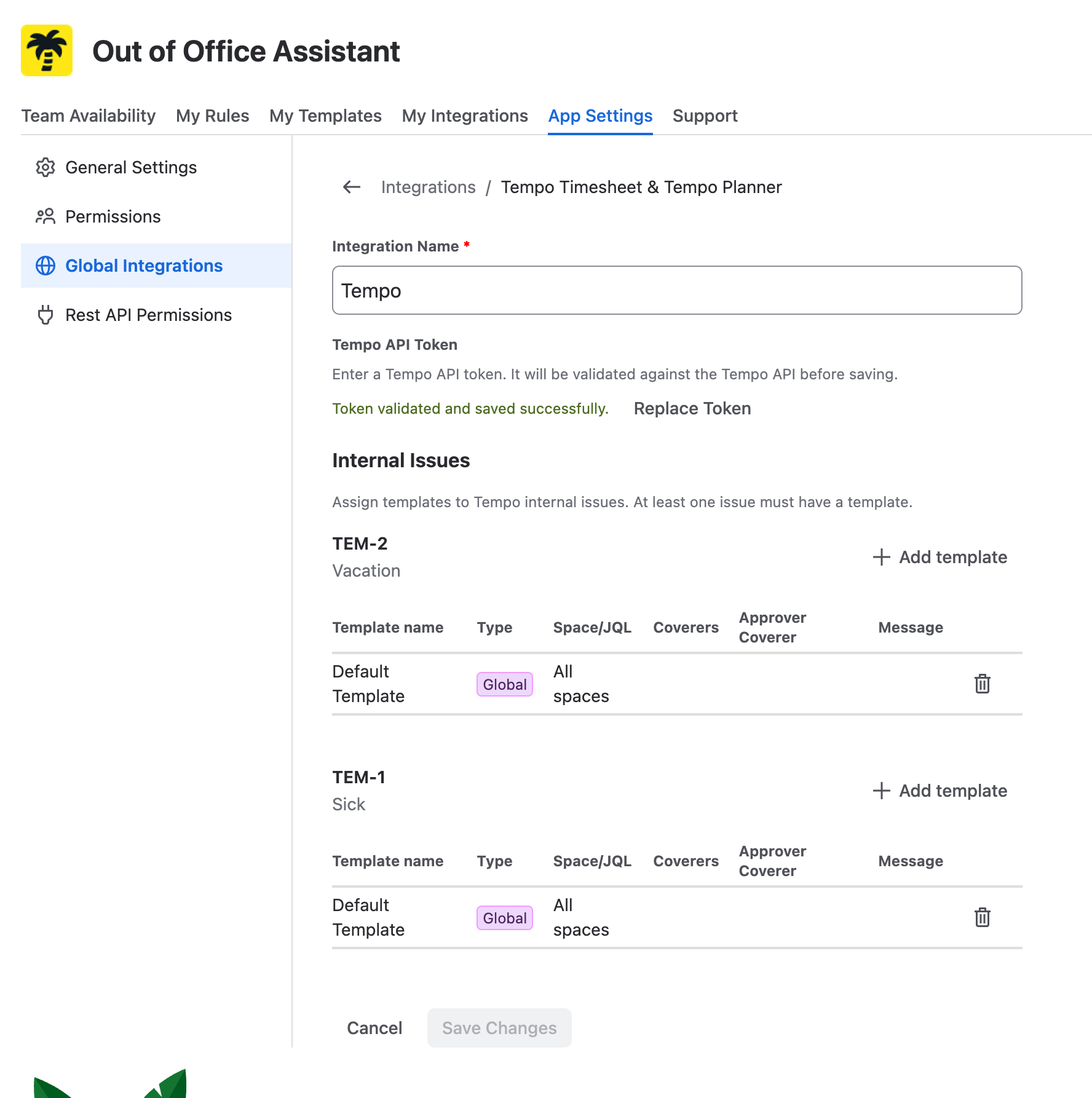
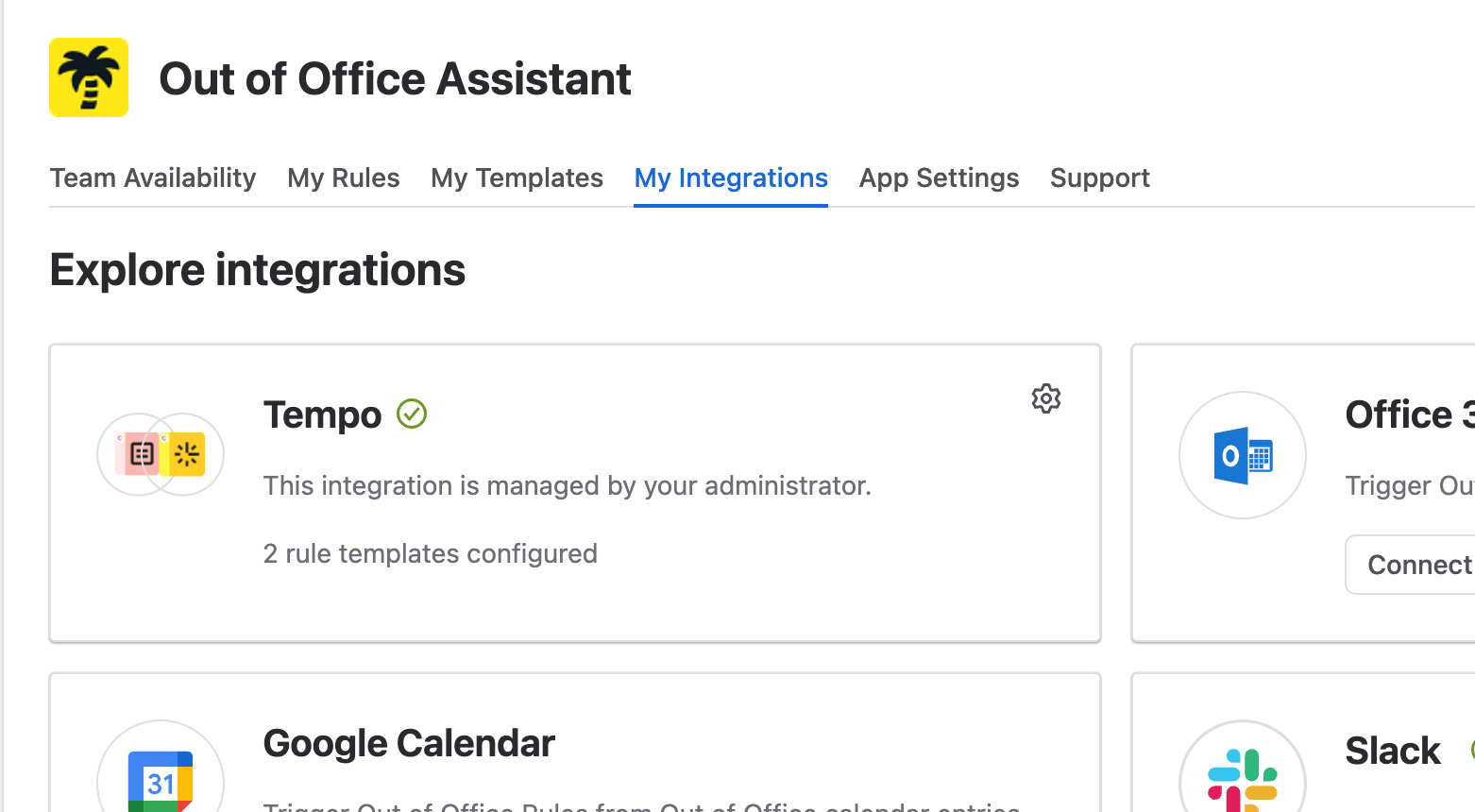
Once Tempo is saved there, it appears under My Integrations for every user, who can change the template mapping:
Microsoft 365 / Outlook
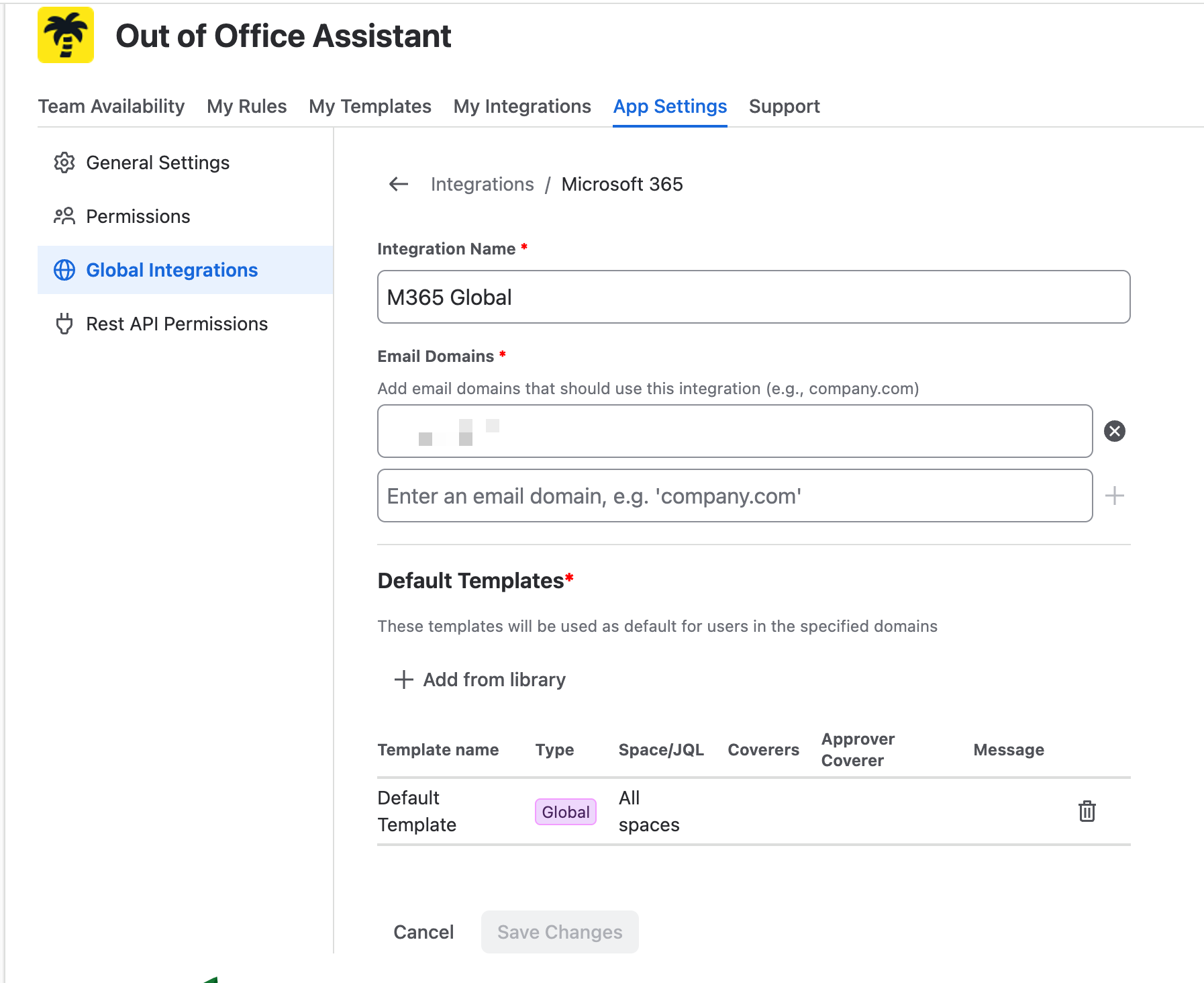
Outlook is now also available as a global integration. Once a Jira admin authorizes it for a Microsoft 365 tenant, every user with an address in one of the configured email domains gets a default configuration: turning on Outlook automatic replies creates a rule, with no further steps. See Microsoft Outlook Integration.
Slack
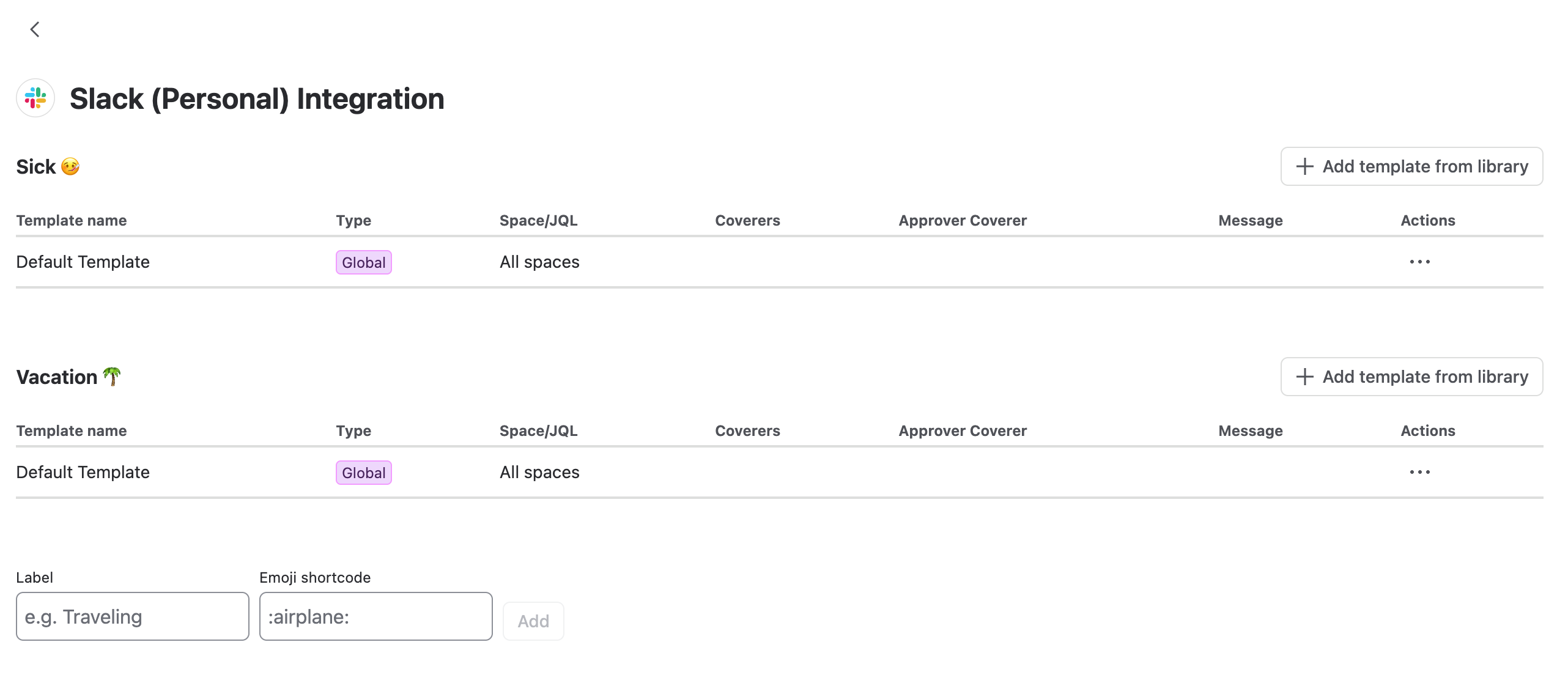
The Slack configuration has moved from Slack into Jira. As with the other integrations, you map templates to Slack status emoji, and rules are created and removed when the Slack status changes.
Sick and Vacation are set up by default; you can add any other emoji and map a template to it. See Slack Integration for Out of Office Assistant.
Zapier integration is no longer available
The Zapier integration has been discontinued.
Reselect the spaces your space admins cover
Space admin delegation must name specific spaces; the Connect version's all projects option is gone. A migrated instance prompts you in Administration > Permissions to reselect them; a space admin can create or change rules and personal templates only inside the spaces named there.
The right to manage other people's rules no longer follows Jira administration rights. Space Admins and Out of Office Admins are both appointed in Administration > Permissions. Jira admins keep full access without being appointed.
The full model is on Permissions and Access Requirements.
Where things are now
Every tab was renamed, so Connect-era instructions will not match the app.
Connect version | Forge version |
|---|---|
User view | Team Availability |
Rules | My Rules |
Templates Library | My Templates. The library is now a picker inside an integration, under Add template from library |
Integrations | My Integrations |
Settings | Administration, only for Jira admins, divided into General Settings, Permissions, Global Integrations, Personal Integrations and Rest API Permissions |
Customer Support | The Help menu in the app header |
The separate administration screen | Gone. Site-wide configuration sits on the Administration tab inside the app, no longer in the Jira administration area; other people's rules are managed from Team Availability |
Two entry points of the Connect version are missing. The link in your Jira profile is gone for good, because Forge does not offer it. The entry point inside a space is not available at the moment and is coming back soon.
Rules are scoped by Spaces now rather than projects, following Jira's wording. Interface Tour and Navigation Guide walks through the rebuilt screens.
Check these after your instance is upgraded
In My Rules, confirm your rules carry the dates, scope and coverers you expect.
In My Integrations, reconnect anything that no longer shows as connected.
Edit every query that used a dotted search alias.
In Administration > Permissions, reselect each space admin's spaces and check both admin lists.
In Administration > Rest API Permissions, replace each legacy token with a new one before 31 December 2026 and point your integrations at the new base URL.
If you manage rules for Jira Service Management customers, choose the customer groups under Customers in Administration > General Settings > Service Management.