

Integrations
Out of Office Assistant can take an absence you have already recorded somewhere else - an automatic reply, a calendar entry, a chat status, an absence plan - and create the matching Out of Office rule in Jira from it. A REST API covers what you would rather drive from your own code.
Where integrations live
Open Apps in the Jira navigation and select Out of Office Assistant.
Select the My Integrations tab. Each integration has one card there, under the heading "Explore integrations".
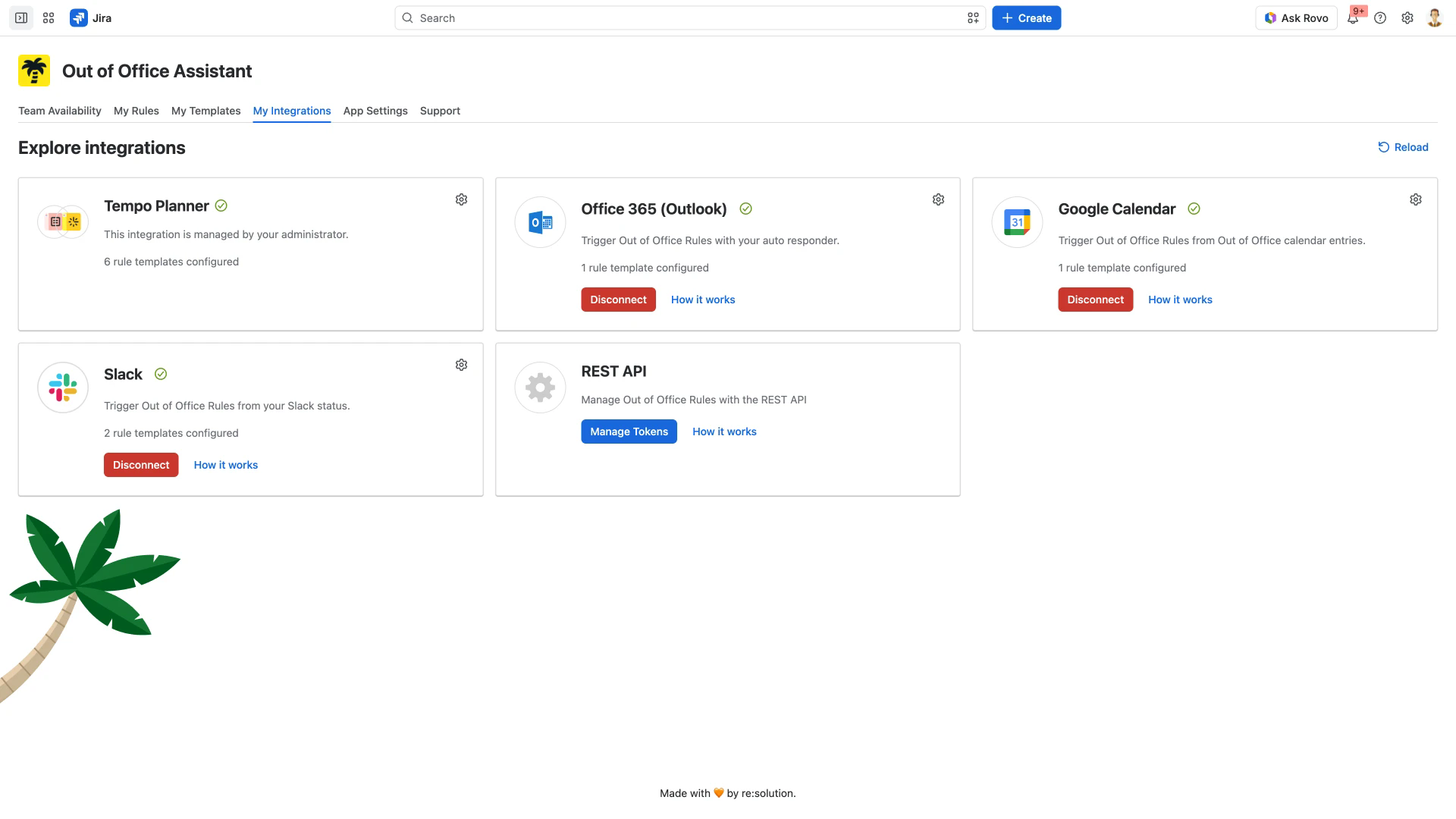
The controls vary by card and by connection state:
Connect is the only action on an unconnected Office 365 (Outlook), Google Calendar or Slack card. Authorizing the service is covered by that integration's guide.
The gear icon in a card's top right corner is the Configure button. One click opens that integration's own page, where you attach the rule templates it should use. It is on Tempo Planner and on each connected card; an unconnected card and the REST API card have none.
Disconnect ends a connection. It appears on Office 365 (Outlook), Google Calendar and Slack.
Manage Tokens, on the REST API card, opens the token list.
A How it works link sits on every card except Tempo Planner.
A green check beside the name marks a connected integration. The line under it counts the rule templates attached, and that count matters: an integration creates one rule per attached template, so a single absence can produce several rules. Templates for Out of Office Rules covers what a template holds.
Reload, at the top right, re-checks each integration and updates the cards without a browser reload.
If an integration cannot be loaded, the app flags it as failing rather than quietly dropping the rules it would have created. Reconnect it, or ask your administrator to.
Personal connections and administrator ones
Office 365 (Outlook), Google Calendar and Slack are connected by each person from their own card. Tempo Planner is set up once by an administrator in App Settings > Global Integrations, and its card reads "This integration is managed by your administrator". Microsoft 365 can be added for the whole instance in the same place.
Pick your integration
Each guide below covers connecting the service, what triggers a rule, and its Configure settings.
Card in My Integrations | What it does | Guide |
|---|---|---|
Microsoft 365 (site-wide) | An administrator connects it once for named email domains, so rules are created for everyone in them. Set up in App Settings > Global Integrations, not from a personal card. | |
Office 365 (Outlook) | Creates a rule from an Outlook automatic reply | |
Google Calendar | Creates a rule from an out-of-office calendar entry | |
Slack | Creates a rule from your Slack status | |
Tempo Planner | Creates rules from Tempo Timesheets and Tempo Planner absences | |
REST API | Create and manage rules from your own code |