

Approval Delegation for Jira Service Management
An out of office rule can hand your approvals to a colleague. Name an approver coverer on the rule and, for as long as the rule is active, Jira Service Management requests waiting for your approval go to that person instead of waiting for you to come back.
Before you start
The app replaces the people named in an approval field. It does not add approvals to a workflow, so there is only something to approve if the workflow has an approval step.
Neither you nor your approver coverer needs an agent licence. In Jira Service Management, approvers only have to be customers of the service space (Atlassian: What are approvals?). The approver coverer can be an agent or a customer. An approver who is a portal customer can have approvals handed over too, see Creating Out of Office Rules for JSM Customers.
Approver coverers are set per rule, not once per user. One rule can name approver coverers, coverers who take over assignment, or both.
Name an approver coverer
Open Apps > Out of Office Assistant in the Jira navigation bar and choose the My Rules tab.
Select Add rule for myself, or open Actions > Edit on a rule you already have.
Set the dates and the scope. Rule Configuration Guide covers every field on the form; only the two below are specific to approvals.
In Approver Coverers, type your colleague's name and select them from the list.
In the selector beside it, choose which Jira approval field the swap acts on. It lists the approval fields of your site, for example Approvers, the default. Leave it on Approvers unless the approval you need covered is held in another field.
Select Create Rule.
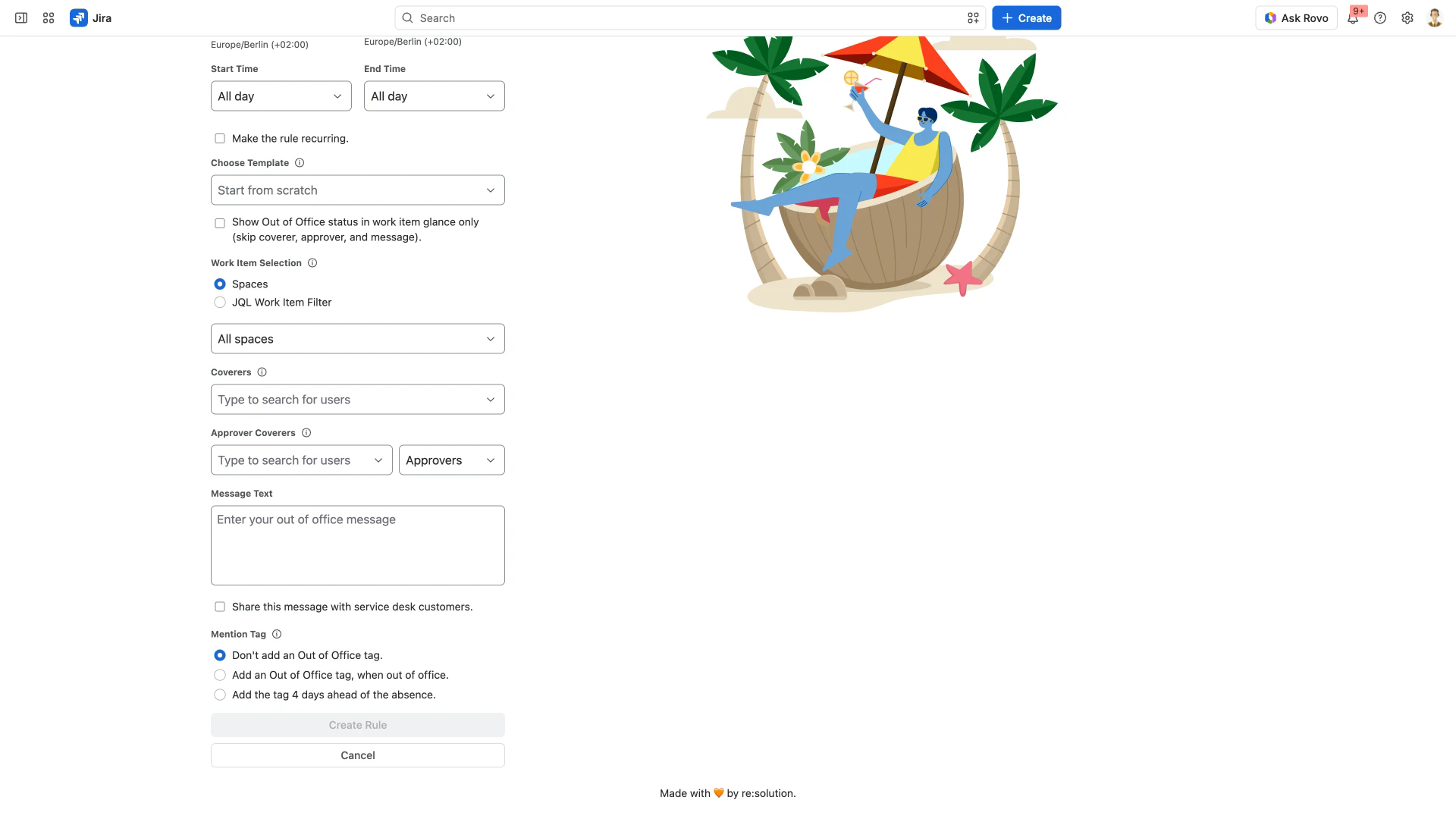
Create Rule stays disabled until the rule does something. An approver coverer on its own is enough; you do not have to name a coverer for assignment as well.
Ticking Show Out of Office status in work item glance only removes Approver Coverers from the form. A status-only rule shows your absence and delegates nothing.
What happens while the rule is active
An approval waiting on you passes to the approver coverer named in the rule, and they can decide it in your place.
The swap follows the approval field rather than the assignee. You are replaced on every work item in the rule's scope where you appear in that field, including work items assigned to someone else.
If your approver coverer is already an approver on the work item, you are taken off the approval and it continues with the approvers already on it rather than stalling for a second decision from the same person.
Tracking and reclaiming
Approver swaps are recorded in the Reassignment Log alongside the work items the rule reassigned, including swaps that failed and swaps where the stand-in approver is out of office as well. When the rule ends, the approvals it delegated are reclaimed automatically. If you delete the rule or change its approver coverer, the swaps it made are reversed within seconds; a newly named approver coverer is put in with the app's next periodic run, not at the moment you save; work items whose assignee was changed are taken back separately. Reclaiming Reassigned Issues covers the log and reclaiming in full.
An interactive walkthrough of the same flow:
Related pages
Rule Configuration Guide - every field on the rule form.
Coverer Setup and Management - coverers who take over work item assignment.
Agent Availability Display in JSM Customer Portal - what portal customers see while an agent is away.
Creating Out of Office Rules for JSM Customers - rules for approvers who are portal customers rather than agents.