

Analytics & Reporting
Common questions about meeting analytics, reports, and performance metrics in NASA.
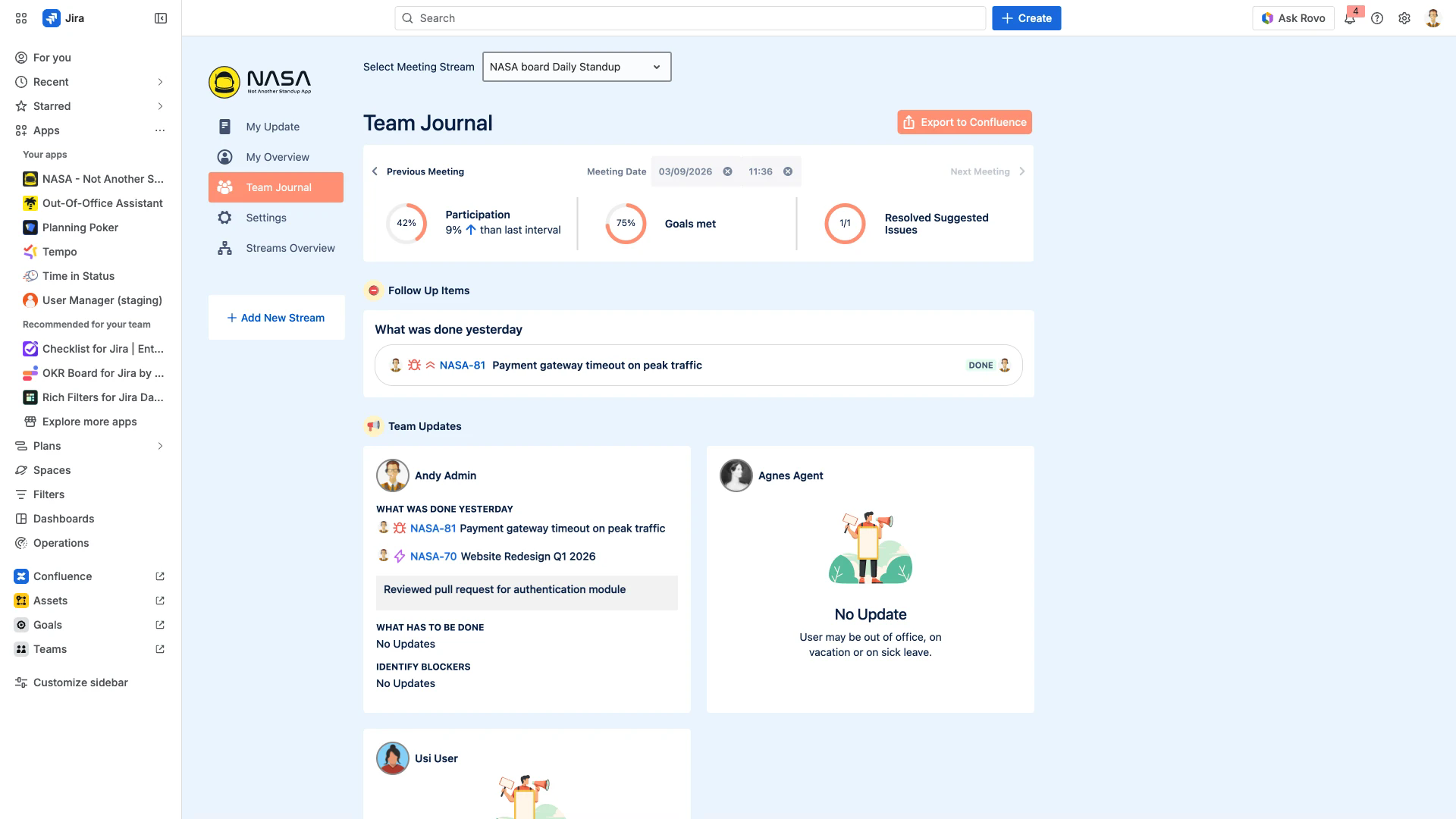
Team Journal
How does NASA generate post-meeting summaries?
After each standup meeting ends, NASA automatically generates a summary in the Team Journal. The summary includes all participant updates, follow-up items, and three analytics graphs: Participation rate, Goals Met percentage, and Resolved Suggested Issues count.
How many meeting summaries are stored in the Team Journal?
The Team Journal stores up to 30 meeting summaries per stream. You can navigate between summaries using the Previous Meeting and Next Meeting controls, or select a specific date.
Who can view the Team Journal?
All members of the meeting stream can view the Team Journal and its analytics. Non-members cannot access another stream's Team Journal.
What information does a Team Journal summary include?
Each summary contains:
Individual updates from all participants (grouped by meeting question)
Follow-up items with linked Jira issues and their status
Three progress graphs: Participation, Goals Met, and Resolved Suggested Issues
Comparison data showing trends from the last interval
My Overview
How can I track my individual performance?
Open My Overview from the left sidebar. It displays your personal metrics: Issues Left, Goals Met percentage, and Standup Participation rate. A work output graph shows your activity over time.
Is the data in My Overview updated in real time?
Yes. All metrics in My Overview and the Team Journal update in real time as meetings are completed and issues are resolved.
Can other team members see my individual metrics?
My Overview is visible only to you. Other stream members can see aggregated team data in the Team Journal, but not individual My Overview screens.
Data Access & Export
Can non-members access a stream's analytics?
No. Only members of the specific meeting stream can view that stream's Team Journal and analytics. Users outside the stream have no access.
Can I export the Team Journal to Confluence?
Yes. The Team Journal includes an Export to Confluence button that publishes the meeting summary as a Confluence page. This is the only supported export method.
Limitations
Does NASA support custom reports or drill-down analytics?
No. NASA provides three fixed analytics graphs (Participation, Goals Met, Resolved Suggested Issues) in the Team Journal and individual metrics in My Overview. Custom reports, drill-down functionality, and export to external analytics tools are not available.
Can NASA replace Jira's built-in reporting for velocity or burndown?
No. NASA focuses on standup meeting analytics. For sprint velocity, burndown charts, and other project-level reports, use Jira's built-in reporting tools.
Related Pages
Team Journal - post-meeting summaries with analytics graphs
My Overview - individual performance metrics and work output
Meeting Management - configure and manage meeting streams
Live Meeting Features - in-meeting controls and participant actions