

Notifications & Alerts
Common questions about meeting reminders and notifications in NASA. Currently, Slack is the only supported notification method.
NASA currently supports Slack notifications only. Email notifications are not available.
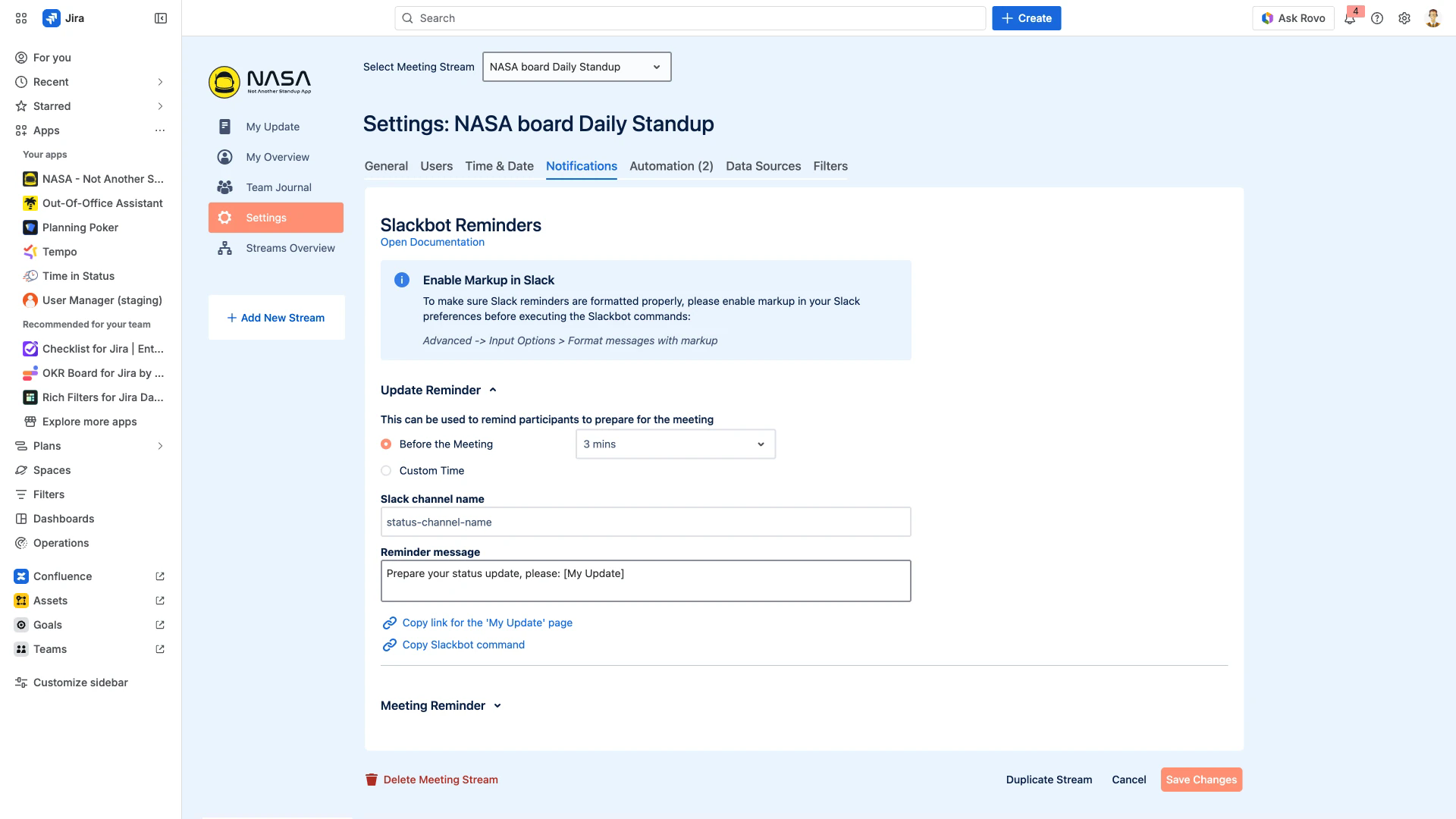
The following screenshot shows the Notifications settings tab where Slack reminders are configured.
Notification Types
What types of notifications does NASA support?
NASA supports two types of Slack notifications:
Update Reminder - Reminds participants to prepare their status updates before the meeting starts.
Meeting Reminder - Notifies all users that a standup meeting is about to begin.
Both are delivered as Slackbot /remind commands to a designated Slack channel. See Notifications for configuration details.
Are email notifications available?
No. NASA uses Slack as its only notification channel. There are no email, SMS, or in-app notifications.
Are there in-app visual indicators for unread notifications?
No. NASA does not display visual indicators, badges, or pop-up alerts within the app. All notifications are delivered through Slack.
Configuration
Who can configure notification settings?
Only a Scrum Master or Administrator can configure notifications. Individual participants cannot change notification settings. See Notifications for the available options.
Can notification timing be customized?
Yes. For each notification type you can choose:
Before the Meeting - Set a number of minutes before the scheduled meeting time (e.g., 3 minutes, 15 minutes).
Custom Time - Set a specific time of day for the reminder.
Meeting times are configured in the Time & Date settings tab.
Are notifications configured per stream or globally?
Notifications are configured per meeting stream. Each stream has its own Slack channel, reminder message, and timing. There is no global notification setting that applies to all streams.
How are notifications delivered to a Slack channel?
NASA generates a Slackbot /remind command that you copy and paste into your Slack channel. The command includes the channel name, reminder message, and a direct link to the My Update page. Use the Copy Slackbot command button on the Notifications settings tab.
Slack Integration
How do Slack reminders work with NASA?
NASA does not send Slack messages directly. Instead, it generates Slackbot /remind commands that you execute in Slack. These commands schedule recurring reminders in your chosen Slack channel with a customizable message and a link back to NASA.
Can I mute NASA notifications?
Yes. Since notifications are delivered through a Slack channel, you can mute or leave the channel directly in Slack. This is managed in Slack, not in NASA.
Is Microsoft Teams supported?
No. NASA currently supports Slack only. Microsoft Teams integration is not available.
Limitations
Can participants customize their own notification preferences?
No. Notification settings are controlled by the Scrum Master or Administrator at the stream level. Individual participants cannot set personal notification preferences within NASA.
Can notifications alert about incomplete or missing updates?
No. The current notification system only sends time-based reminders (to prepare updates and to join meetings). There are no alerts triggered by missing or incomplete standup entries.
Can notification settings be transferred between streams?
No. Notification settings cannot be imported or exported between meeting streams. Each stream must be configured independently. See Meeting Settings for other per-stream configuration options.
Related Pages
Notifications - Configure Slack notification settings per stream
Meeting Settings - Meeting-level configuration options
Time & Date - Schedule meeting times and intervals
Troubleshooting - Common issues and solutions