

User Roles
Common questions about managing Scrum Master, Coverer, and Participant roles in NASA meeting streams.
Role Differences
What is the difference between Scrum Master, Coverer, and Participant?
The Scrum Master leads and manages the meeting. Coverers can start and lead meetings when the Scrum Master is unavailable. Participants attend meetings and provide their updates. See User Roles & Permissions for detailed permissions.
Who can start a meeting?
The Scrum Master and any assigned Coverer can start a meeting. Participants cannot start meetings on their own.
Who can edit stream settings?
The Scrum Master and Jira administrators can edit stream settings. Coverers and Participants cannot change settings. See Meeting Settings for available options.
Can a Coverer also be a Participant?
Yes. A Coverer can participate in meetings like any other team member while also having the ability to step in for the Scrum Master.
Assigning Roles
How do I assign a Scrum Master?
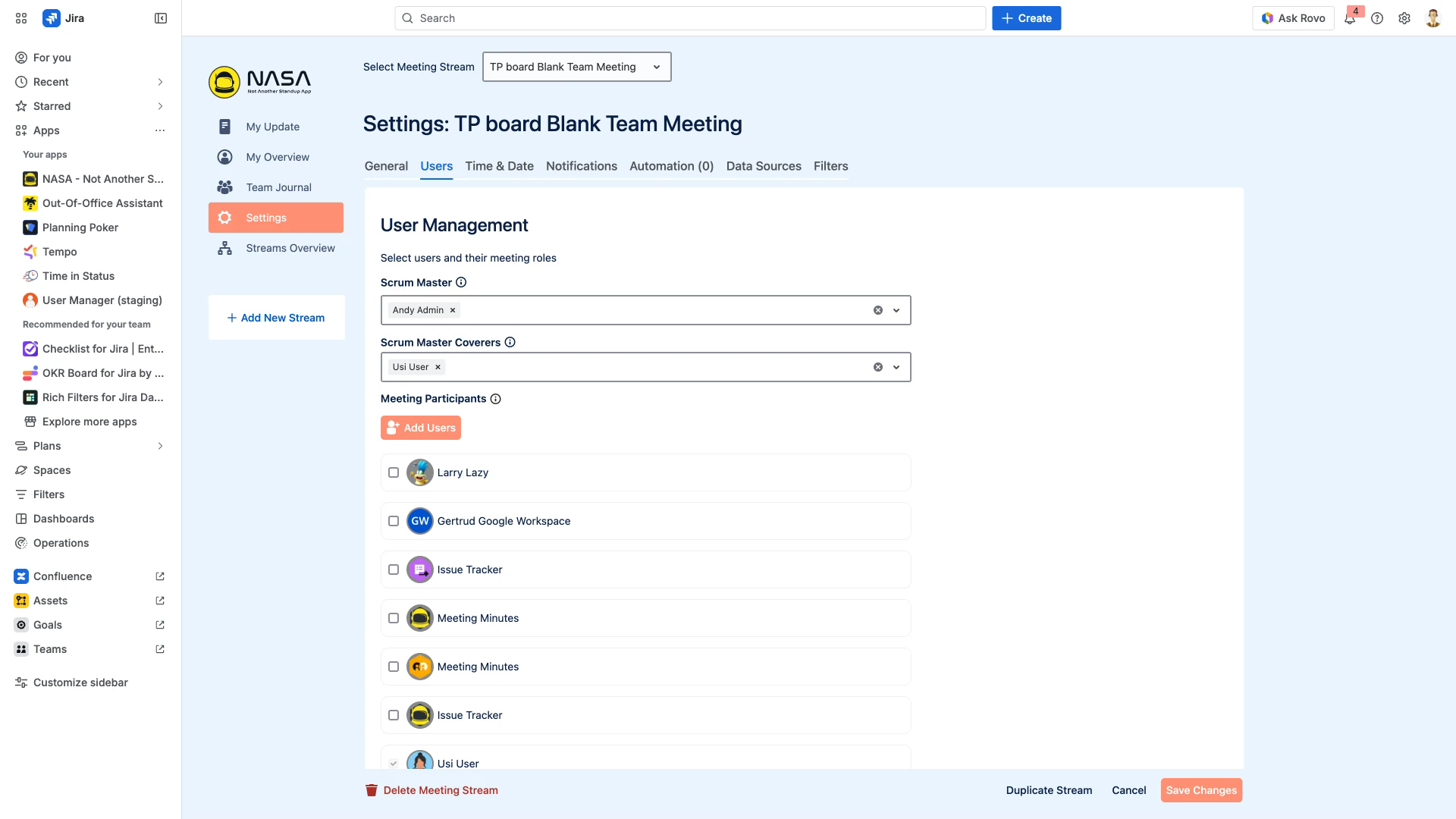
Open the Users settings tab under Settings. In the Scrum Master field, start typing a Jira user's name and select them from the dropdown.
How do I add Coverers?
In the Users settings tab, use the Scrum Master Coverers field to search for and select one or more Jira users.
How do I add Participants?
In the Users settings tab, click Add Users under Meeting Participants. Select the checkboxes next to each user you want to include.
Are there requirements for being assigned as Scrum Master or Coverer?
No. Any Jira Cloud user on the instance can be assigned as Scrum Master or Coverer. There is no approval process.
Changing Roles
Can roles be changed after stream setup?
Yes. Open the Users settings tab and reassign the Scrum Master, add or remove Coverers, or update the Participant list at any time.
Can roles be changed during a live meeting?
No. Role changes only take effect before or after a meeting. You cannot reassign roles mid-meeting.
Do roles reset at the start of each sprint?
No. Roles persist until manually changed. They carry over across sprints automatically.
Can roles be bulk edited?
No. Each stream's roles must be configured individually in its Users settings tab.
Coverage and Absence
What happens if the Scrum Master is unavailable?
Any assigned Coverer can start and lead the meeting in the Scrum Master's place. This is the primary purpose of the Coverer role.
How do Coverers know when to step in?
All participants wait in a lobby before the meeting starts. If the Scrum Master does not start the meeting, a Coverer can see this and take over. There is no automatic notification for this.
What if my team has no dedicated Scrum Master?
Assign the team lead as Scrum Master and add remaining team members as Coverers. This gives everyone equal permissions to start and lead meetings.
Multi-Stream Roles
Can a user have different roles in different streams?
Yes. Roles are configured per stream. A user can be the Scrum Master in one stream and a Participant in another.
How are multi-stream roles managed?
Each stream has its own Users settings tab. Changes to roles in one stream do not affect any other stream.