

Troubleshooting
In case of problems or unexpected behaviour, our support needs more specific details to find out what the cause is.
In order to do that, please follow the steps below, when raising a ticket and provide the information gathered in the process.
The first thing to do is to change the log level in Jira...
Changing log level in Jira
Depending on the amount of users in your system, logging will produce a lot of records, please don't forget to turn it off again.
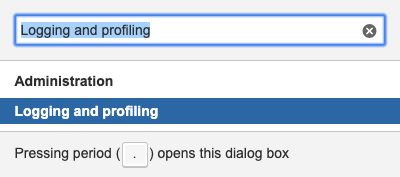
Press the G key on your keyboard twice to get the navigation search box and search for
logg and click on Loggin and profiling:
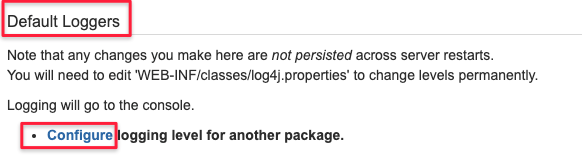
On the page opened, scroll down to "Default Loggers" and click on the "Configure" link:
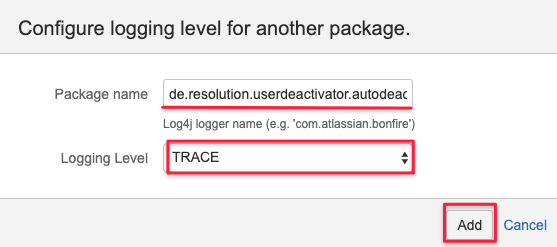
Depending on if you have problems with a scheduled auto deactivation job or the "Browse Users" function,
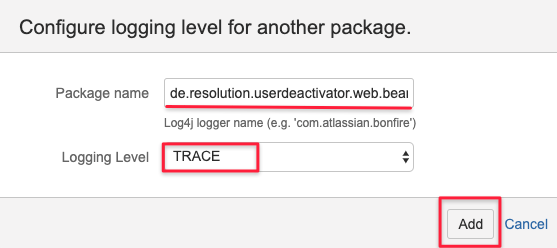
change the log level to TRACE for the corresponding package and click Add:
Logging for automatic deactivation jobs
- de.resolution.userdeactivator.autodeact
Logging for the browse user filter operation
- de.resolution.userdeactivator.web.bean
Reviewing and retrieving the logs
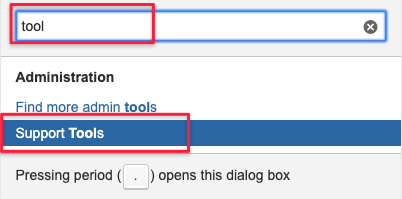
Press the G key on your keyboard twice to get the navigation search box and search for
tool and click on Support Tools:
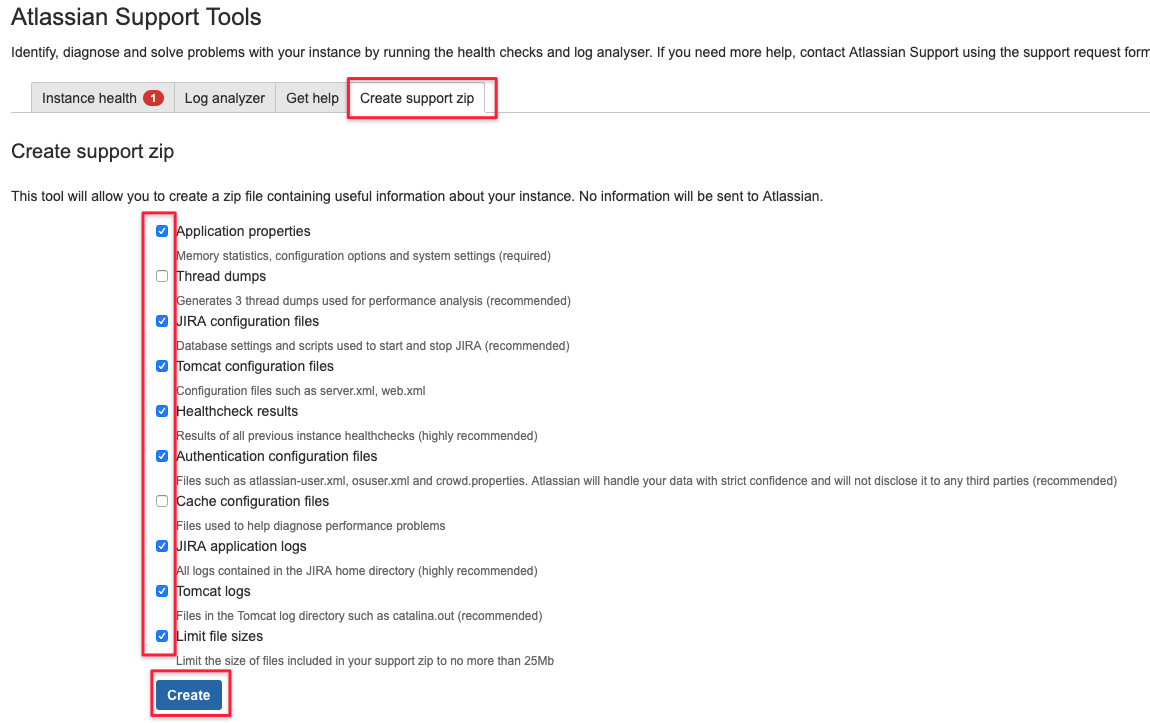
Click on the "Create support zip" tab, tick the boxes as shown below and click on Create:
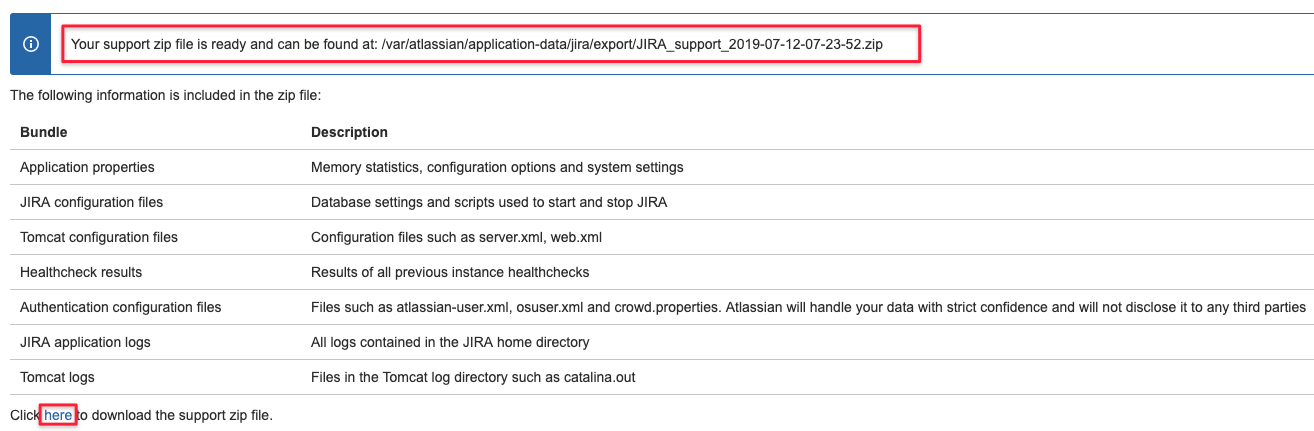
You are then able to download the zip file with the link at the bottom and you'll also see where the files was saved on the Jira server,
i.e. to delete it later.
Attach the file to the ticket.
Depending on the what is not working as expected, you could also review the log file yourself and proceed as follows.
Problems with automatic deactivation jobs
If you edit and save an automatic deactivation job, it is scheduled to run after one minute and then after 24 hours again.
Looking at the log file will reveal more details related to the operation and looks like this:
- 2019-07-12 07:05:09,420 http-nio-8080-exec-8 DEBUG admin 425x9708x1 jkjec3 87.173.212.138,100.120.0.2 /secure/admin/user/AutoDeactivateEdit!editSubmit.jspa [d.r.userdeactivator.autodeact.AutoDeactivateManagerImpl] Setting auto-deactivation with autoDeactivateBean: {"uuid":"6268129b-95fc-4ce3-88f9-368551849b9d","active":true,"emailMessage":"This message is sent to alert you about deactivated users. If you are unsure why you got this email, please contact your Jira administrator.","emailaddress":"","monthsSinceLastLogin":"1","dayBeforeEmail":"-1","groups":"allow-password-login, jira-servicedesk-users","groupsExcluded":""}
- 2019-07-12 07:05:09,421 http-nio-8080-exec-8 DEBUG admin 425x9708x1 jkjec3 87.173.212.138,100.120.0.2 /secure/admin/user/AutoDeactivateEdit!editSubmit.jspa [d.r.userdeactivator.autodeact.AutoDeactivateManagerImpl] Saving auto-deactivation: {"uuid":"6268129b-95fc-4ce3-88f9-368551849b9d","active":true,"emailMessage":"This message is sent to alert you about deactivated users. If you are unsure why you got this email, please contact your Jira administrator.","emailaddress":"","monthsSinceLastLogin":"1","dayBeforeEmail":"-1","groups":"allow-password-login, jira-servicedesk-users","groupsExcluded":""}
- 2019-07-12 07:05:09,427 http-nio-8080-exec-8 DEBUG admin 425x9708x1 jkjec3 87.173.212.138,100.120.0.2 /secure/admin/user/AutoDeactivateEdit!editSubmit.jspa [d.r.userdeactivator.autodeact.AutoDeactivateManagerImpl] Saved auto-deactivation in 2 pieces.
- 2019-07-12 07:05:09,427 http-nio-8080-exec-8 INFO admin 425x9708x1 jkjec3 87.173.212.138,100.120.0.2 /secure/admin/user/AutoDeactivateEdit!editSubmit.jspa [d.r.userdeactivator.autodeact.AutoDeactivateManagerImpl] Saved automatic deactivation configuration
- 2019-07-12 07:05:09,427 http-nio-8080-exec-8 INFO admin 425x9708x1 jkjec3 87.173.212.138,100.120.0.2 /secure/admin/user/AutoDeactivateEdit!editSubmit.jspa [d.r.userdeactivator.autodeact.AutoDeactivateManagerImpl] Time since last login is 1 months.
- 2019-07-12 07:05:09,427 http-nio-8080-exec-8 INFO admin 425x9708x1 jkjec3 87.173.212.138,100.120.0.2 /secure/admin/user/AutoDeactivateEdit!editSubmit.jspa [d.r.userdeactivator.autodeact.AutoDeactivateManagerImpl] No reports will be sent, as no email address has been provided.
- 2019-07-12 07:05:09,429 http-nio-8080-exec-8 INFO admin 425x9708x1 jkjec3 87.173.212.138,100.120.0.2 /secure/admin/user/AutoDeactivateEdit!editSubmit.jspa [d.r.userdeactivator.autodeact.SchedulerImpl] Scheduled automatic deactivation check on Fri Jul 12 07:06:09 GMT 2019 repeating every 24 hours.
- 2019-07-12 07:06:09,430 Caesium-1-2 DEBUG ServiceRunner [d.r.userdeactivator.autodeact.AutoDeactivateJobImpl] Execute AUTO Deact ...
- 2019-07-12 07:06:09,433 Caesium-1-2 INFO ServiceRunner [d.r.userdeactivator.autodeact.AutoDeactivateJobImpl] Checking users for automatic deactivation
- 2019-07-12 07:06:09,433 Caesium-1-2 INFO ServiceRunner [d.r.userdeactivator.autodeact.AutoDeactivateJobImpl] Users will be removed from these groups instead of being deactivated: allow-password-login, jira-servicedesk-users
- 2019-07-12 07:06:09,433 Caesium-1-2 INFO ServiceRunner [d.r.userdeactivator.autodeact.AutoDeactivateJobImpl] No reports will be sent as no email address was provided
- 2019-07-12 07:06:09,433 Caesium-1-2 INFO ServiceRunner [d.r.userdeactivator.autodeact.AutoDeactivateJobImpl] Time since last login is 1 months
- 2019-07-12 07:06:09,437 Caesium-1-2 DEBUG ServiceRunner [d.r.u.web.bean.LoUserBrowserFilter] preFilteredUsers list size: 2
- 2019-07-12 07:06:09,439 Caesium-1-2 DEBUG ServiceRunner [d.r.u.web.bean.LoUserBrowserFilter] filteredUsers list size: 1
- 2019-07-12 07:06:09,439 Caesium-1-2 DEBUG ServiceRunner [d.r.u.autodeact.operation.AutoDeactivateOperation] Added allow-password-login to list of groups to remove user from.
- 2019-07-12 07:06:09,439 Caesium-1-2 DEBUG ServiceRunner [d.r.u.autodeact.operation.AutoDeactivateOperation] Added jira-servicedesk-users to list of groups to remove user from.
- 2019-07-12 07:06:09,470 Caesium-1-2 DEBUG ServiceRunner [d.r.u.autodeact.operation.AutoDeactivateOperation] Removed jobo from 2 group(s).
- 2019-07-12 07:06:09,470 Caesium-1-2 DEBUG ServiceRunner [d.r.u.autodeact.operation.AutoDeactivateOperation] Removed 1 users from 2 group(s).
- 2019-07-12 07:06:09,472 Caesium-1-2 DEBUG ServiceRunner [d.r.u.autodeact.operation.AutoDeactivateOperation] Found ApplicationKey: jira-software
- 2019-07-12 07:06:09,472 Caesium-1-2 DEBUG ServiceRunner [d.r.u.autodeact.operation.AutoDeactivateOperation] LicenseDetails Description: JIRA Software (Server) 25 Users: Commercial License
- 2019-07-12 07:06:09,472 Caesium-1-2 DEBUG ServiceRunner [d.r.u.autodeact.operation.AutoDeactivateOperation] Maximum number of users for current JIRA license is 25. Minimum is 11.
- 2019-07-12 07:06:09,472 Caesium-1-2 INFO ServiceRunner [d.r.u.autodeact.soondeact.SoonDeactivateOperation] No users needs to be informed about pending deactivation or removal from groups.
The logs above show the configuration saved and then 1 minute latet beeing executed for the first time.
As groups are provided as plain text by name and separated by comma, these are splitted before the actual operation.
Spaces will be properly trimmed since version 2.1.4/ 3.1.4 of the app.
Problems with the browse user filter operation
Debug logging reveals potential problems with the groups who's members should be excluded from deactivation or group removal.
More logging for potential other issues will be added in a later version of the app.
- 2019-07-12 07:37:40,279 http-nio-8080-exec-6 DEBUG admin 457x10328x1 jkjec3 87.173.212.138,100.120.0.2 /secure/admin/user/LoUserBrowser.jspa [d.r.u.web.bean.LoUserBrowserFilter] groupsExcluded string from UI: 'jira-software-users'
- 2019-07-12 07:37:40,282 http-nio-8080-exec-6 DEBUG admin 457x10328x1 jkjec3 87.173.212.138,100.120.0.2 /secure/admin/user/LoUserBrowser.jspa [d.r.u.web.bean.LoUserBrowserFilter] groupsExcludedFromDeactivation sanitized list: '[jira-software-users]'
- 2019-07-12 07:37:40,282 http-nio-8080-exec-6 DEBUG admin 457x10328x1 jkjec3 87.173.212.138,100.120.0.2 /secure/admin/user/LoUserBrowser.jspa [d.r.u.web.bean.LoUserBrowserFilter] admin is a member of a group flagged to be excluded from deactivation.
- 2019-07-12 07:37:40,282 http-nio-8080-exec-6 DEBUG admin 457x10328x1 jkjec3 87.173.212.138,100.120.0.2 /secure/admin/user/LoUserBrowser.jspa [d.r.u.web.bean.LoUserBrowserFilter] groupsExcluded string from UI: 'jira-software-users'
- 2019-07-12 07:37:40,282 http-nio-8080-exec-6 DEBUG admin 457x10328x1 jkjec3 87.173.212.138,100.120.0.2 /secure/admin/user/LoUserBrowser.jspa [d.r.u.web.bean.LoUserBrowserFilter] groupsExcludedFromDeactivation sanitized list: '[jira-software-users]'
- 2019-07-12 07:37:40,282 http-nio-8080-exec-6 DEBUG admin 457x10328x1 jkjec3 87.173.212.138,100.120.0.2 /secure/admin/user/LoUserBrowser.jspa [d.r.u.web.bean.LoUserBrowserFilter] jobo is a member of a group flagged to be excluded from deactivation.
The sample above shows that one group name has been added and that one user is filtered out because of that.